
What Is DRM Video? Why You Can't Download OnlyFans Content (Full 2026 Breakdown)
You paid to subscribe to an OnlyFans creator, came across a video you really liked, and wanted to save it — only to find there's no download option on right-click, screenshots come out as a black screen, and every download tool you try either throws an error or spits out a garbled file. Worse still, some creators delete their posts, and the content you paid for can vanish completely the next day, leaving you with nothing.
This isn't a technical glitch on OnlyFans — it's the platform's deliberately deployed DRM video protection doing exactly what it's designed to do. According to Digital TV Research's 2025 data, more than 85% of paid video content platforms worldwide have enabled some level of DRM encryption, and OnlyFans is among them. Understanding what DRM is, how it actually works, and what solution genuinely works is what this article sets out to make clear.

So What Exactly Is DRM?
DRM (Digital Rights Management) is an encryption-based protection system built specifically for digital content, controlling who can use media files like video and audio, where they can use them, and for how long. According to Grand View Research's 2025 data, the global DRM market has already surpassed $4 billion, with an annual growth rate of over 15% — driven at its core by the urgent demand from content creators and platforms for copyright protection.
It's not as simple as slapping a password on a file. A DRM system involves a complete chain of key management, authorization verification, and playback control. Every time you play a video on OnlyFans, behind the scenes your device first sends an authorization request to the platform's License Server, the server verifies your subscription status and device identity, and then issues a temporary decryption key. Once playback ends, the key expires, and the video file itself remains encrypted the entire time — even if you "download" it locally with some tool, what you get is ciphertext that can't be unlocked without the key.
The most mainstream DRM solutions in the video industry today are Google's Widevine, Microsoft's PlayReady, and Apple's FairPlay. Different platforms pick different solutions depending on device type; in most scenarios OnlyFans uses HLS encrypted streams paired with Widevine protection, while mobile is covered by the corresponding native DRM solutions.
How Exactly Does OnlyFans Lock Its Videos Down?
OnlyFans video protection isn't a single measure — it's several layers of mechanisms stacked together.
At the content delivery layer, OnlyFans uses the HLS (HTTP Live Streaming) protocol to distribute video. The video is sliced into a large number of small segments, each encrypted with AES-128. What you capture isn't a complete video file but hundreds of encrypted little chunks, plus an m3u8 index file that controls playback order and the decryption keys. The key URL inside that index file is dynamically generated, different with every request, and requires your logged-in status to obtain.
At the playback layer, decryption happens inside the system-level TEE (Trusted Execution Environment), where no external program can read the decrypted content. This is precisely why screen recording tools only capture a black screen during OnlyFans video playback — the decrypted frames never appear in memory that ordinary programs can access.
At the platform level, additional restrictions are layered on: there's no official download option whatsoever, creators can delete content at any time and subscribers immediately lose access once it's gone, and after an account ban all previously paid-for content becomes inaccessible too. In 2025, OnlyFans further strengthened its anti-screen-recording detection on some content, triggering account risk controls for abnormal playback behavior.
You Paid and Still Can't Save It — What Real Pain Points Does DRM Cause?
According to Statista's 2025 survey of paid content platforms, more than 51% of subscribers said they had felt frustrated at being unable to save content, with the proportion among OnlyFans users higher than on other streaming platforms — and the reason is straightforward: OnlyFans content can disappear at any moment.
Content can vanish at any time, and your money goes down the drain. A creator deletes a post, deactivates their account, or your subscription expires — and the videos you paid for are gone for good. No download option, no way to back up, nothing you can take with you. This is completely different from Netflix, where the content library is at least stable.
No offline viewing. Without a connection, or in a poor-network environment, you can't watch a single piece of OnlyFans content, because the platform has no offline functionality of any kind — everything requires real-time online authorization to play.
Screen recording and screenshots both fail completely. Anyone who has tried screen recording knows that recording software only captures a black screen while an OnlyFans video plays. The same goes for screenshots; on some devices even the system screenshot gets blocked. For users who want to keep content, this leaves virtually no way out.
Ordinary download tools simply can't handle it. The tools out there that can download regular web videos fail almost without exception against OnlyFans's encrypted HLS streams — either what they grab is unplayable encrypted segments, or they throw an error and can't parse it at all.
Why Are Ordinary Download Tools Helpless Against OnlyFans Videos?
This is a fundamental problem at the level of technical architecture, not something tool optimization can work around.
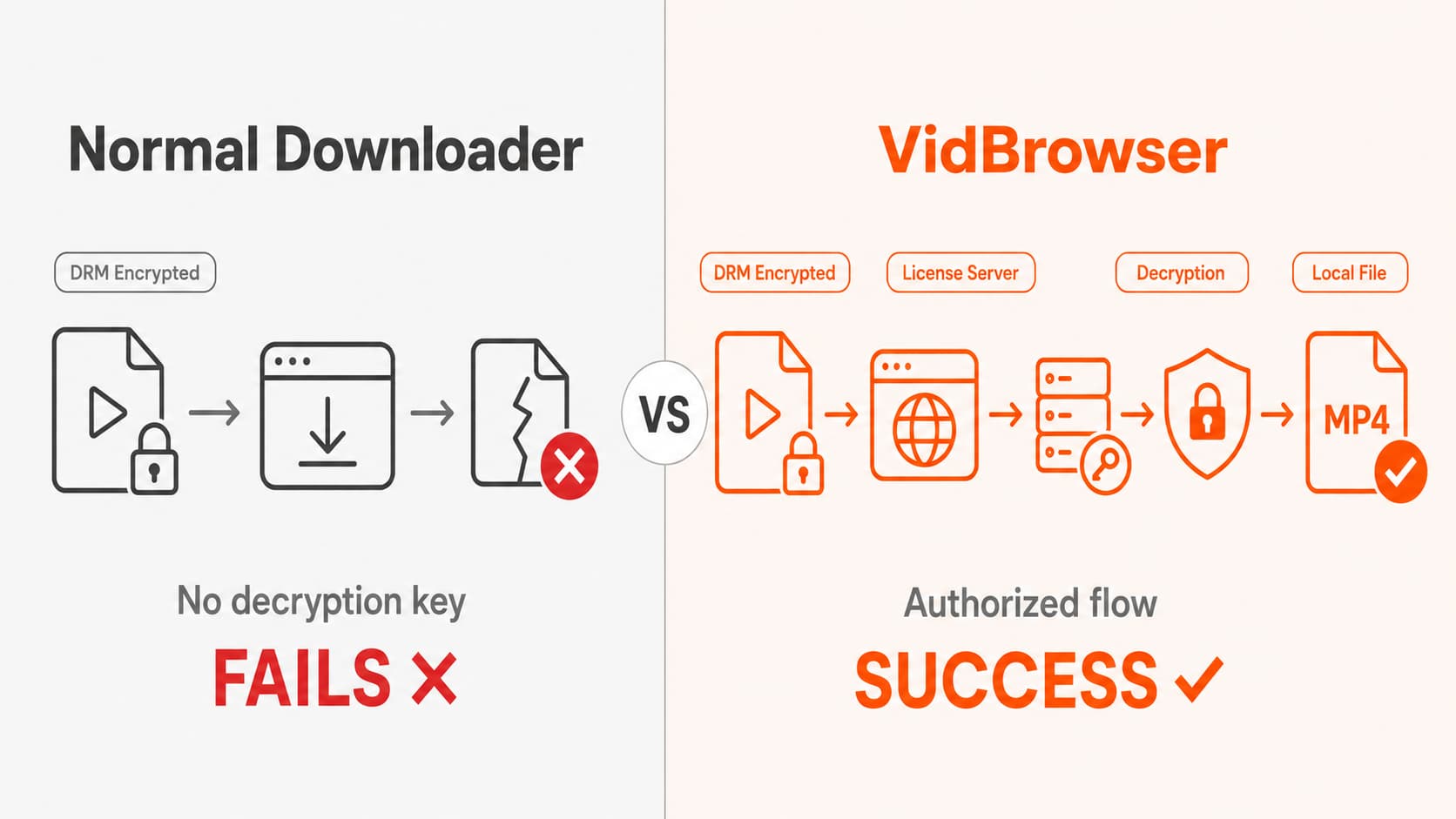
The logic of an ordinary video download tool is: find the URL of the video stream, then directly download the content at that address. For unencrypted video, this works perfectly. But OnlyFans video is delivered as encrypted HLS segments, each requiring its own decryption key, and that key is dynamically issued by the platform's server, demanding that your account be in a valid subscription state and that the request come from a legitimate playback session.
What ordinary tools grab are encrypted segments, and the key URL they obtain has often already expired or can't be authorized within the tool's request context. Even if a tool could fully capture all the segments, without a valid decryption key the merged file is just unplayable garbage.
Screen recording tools fail for a different reason. OnlyFans video decryption is completed inside the TEE, and at the final step of rendering frames to the screen, some platforms use a hardware-level content protection channel — what the recording software captures is the blank outside the protection layer, not the actual video content. This is also why many users find that when recording an OnlyFans video, the screen clearly shows a picture, but the recording comes out as nothing but a black screen.
Put plainly: the decryption key for DRM video never appears "on the outside," and the logic of ordinary tools grabbing the stream from the outside simply doesn't work against this architecture.
Can OnlyFans Videos Really Be Downloaded?
There are tools that can do it, but the use case needs to be spelled out first.
What we're discussing here is a subscriber personally saving their own paid content — for instance, to prevent content from disappearing when a creator deletes a post, or to view it offline in a no-network environment. This is an entirely different matter from redistributing content to others. On that premise, there is a solution at the tool level.
VidBrowser is one of the few desktop tools currently able to handle DRM video downloads reliably, and the fundamental difference between it and an ordinary download tool is this: VidBrowser is itself a complete browser, not a plugin or tool grabbing the stream from outside a browser. It has a built-in video recognition and download engine that steps in during the legitimate playback stage, after the DRM authorization flow has completed normally, to save the video content locally. The whole process goes through the platform's authorization chain — it doesn't bypass encryption, nor does it forcibly record the screen or capture frames.
In real-world testing, VidBrowser offers stable support for OnlyFans's DRM-encrypted videos, and the saved quality matches the authorized playback quality. The downloaded file is saved in a local format and plays on any device with ordinary players like VLC or IINA, free from the platform's authorization restrictions and unaffected by creators deleting posts or subscriptions expiring.
Beyond OnlyFans, VidBrowser also supports a complete video workflow:
- Ad-free browsing across the web: blocks ads on any page, including pre-roll ads on video platforms, with no reliance on plugins
- Site-wide video downloads: supports 1000+ platforms — YouTube, TikTok, Twitter, Bilibili and more can all be saved with one click
- Video splitting: long videos are automatically split into multiple segments for easier management
- AI smart editing: trim clips directly in the browser, with AI assistance for precise start and end timestamps
- AI highlight detection: automatically marks the standout moments of a video so you can quickly find what you need
Both Windows and Mac are supported. The flagship edition is $8.9/month and the lifetime buyout is $149. Download VidBrowser for free to try it; the free version lets you save 5 videos a day, so you can get it running before deciding whether to upgrade.
Frequently Asked Questions
Why is there no save option when I right-click an OnlyFans video?
OnlyFans blocks the browser's default right-click save function, and at the same time the video is delivered as an encrypted HLS stream — so even if you get past the right-click menu restriction, what you capture is unplayable encrypted segments, not a complete video file.
Why is screen recording OnlyFans just a black screen?
OnlyFans video decryption is completed within a system-level protected memory region, and the recording software captures the output channel outside the protection layer, getting a black screen instead of the video content. This is normal behavior for hardware-level DRM protection, not a bug in the recording tool.
Can I recover paid content after a creator deletes the post?
It can't be recovered through the OnlyFans platform itself — access permission is revoked immediately once content is deleted. The only way is to have already saved the content locally before the post was deleted. This is one of the core motivations driving many users to look for a download tool.
Is it illegal to download OnlyFans videos to your device?
It depends on your local laws and your purpose. Backing up content for personal use falls into a gray area in most regions, with relatively low legal risk; but distributing it to others or using it commercially is an entirely different matter. OnlyFans's terms of service prohibit users from downloading content, but this is a contractual constraint, not the same as legal liability. This article does not constitute legal advice — refer to your local regulations for your specific situation.
Is there any tool that genuinely supports OnlyFans video downloads?
VidBrowser is currently a fairly stable choice for handling OnlyFans DRM content; running as a complete browser, the authorization flow is completed internally with no extra configuration needed. Download it for free to try; the free quota of 5 videos a day is enough to verify the basic functionality.


