
How DRM Works: Why You Can't Download Streaming Videos (Technical Explainer)
You've been there. You find a great video on Netflix, YouTube Premium, or another streaming platform, try to save it — and nothing works. yt-dlp throws an error. Your screen recorder captures a black screen. Online download tools give you a file that won't play.
This isn't a bug. It's working exactly as designed.
The technology behind it is called DRM — Digital Rights Management — and understanding how it actually works explains why so many download tools fail, why screen recording goes black, and what it takes to handle this content properly.
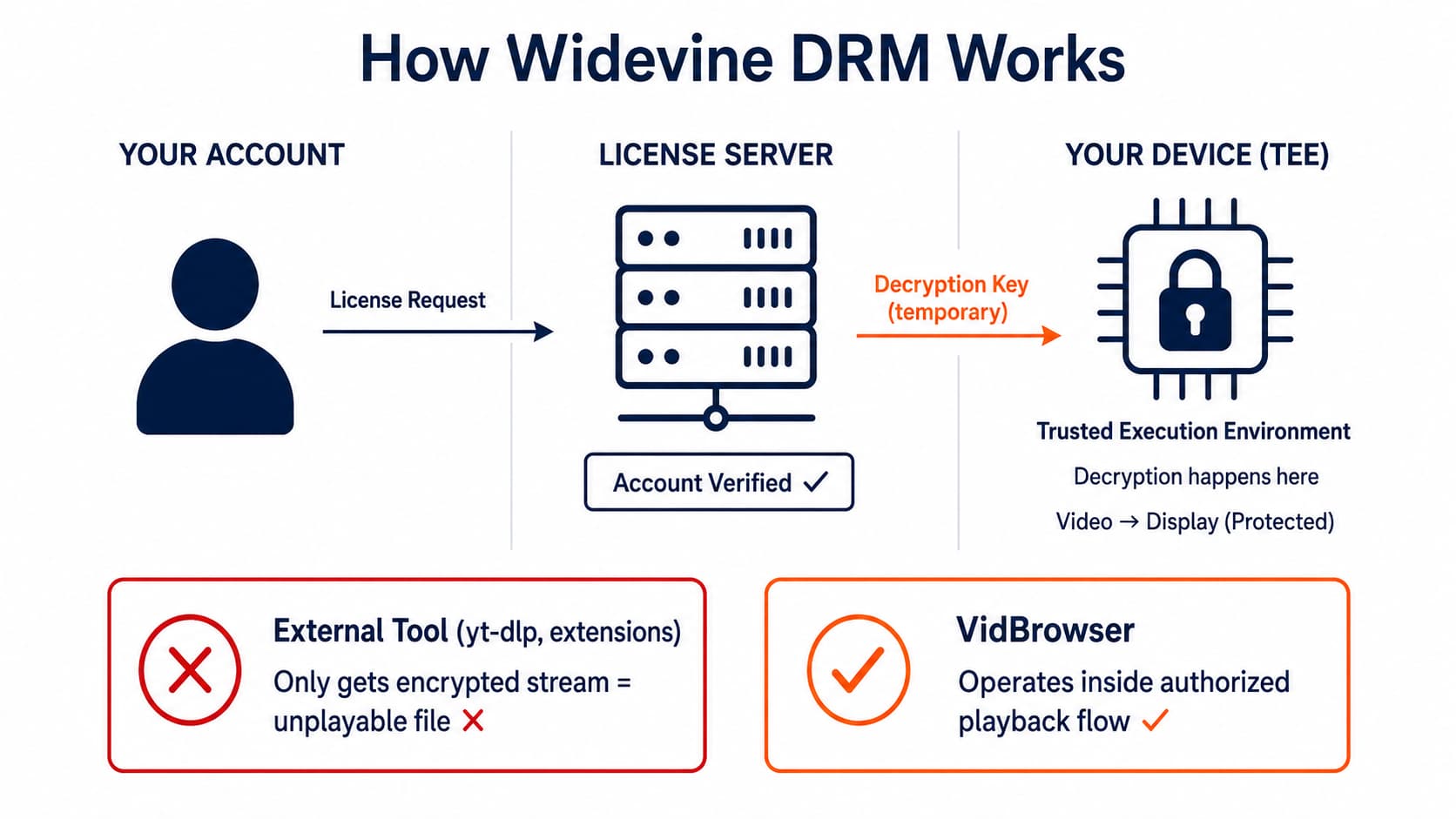
What DRM Actually Is
DRM is a set of technologies that control how digital content can be accessed, copied, and played back. It's been around in various forms since the late 1990s, but the version that matters for video streaming today is a standard called Widevine, developed by a company Google acquired in 2010.
Widevine is built into Chrome, Firefox, Edge, and most Android devices. When a streaming service like Netflix wants to protect its content, it doesn't ship a locked box you need a key to open. It's more dynamic than that — and more sophisticated.
Here's the simplified version of what's actually happening when you hit play on a streaming platform.
The DRM Playback Flow, Step by Step
Step 1: You request the video
You click play. Your browser sends a request to the streaming service's content server asking for the video.
Step 2: The license request
Before any video data is sent, your browser sends a separate request to a license server — a server operated by the streaming platform (Netflix, YouTube, Disney+, etc.). This request says, in effect: "I have a user who wants to play this video. They're using this device, this browser, this version of Widevine. Can they?"
The license server checks your account, your subscription status, whether you've exceeded device limits, your geographic region, and the security level of your playback environment.
Step 3: The license is issued (or denied)
If everything checks out, the license server sends back a content decryption key — a temporary cryptographic key that your browser can use to decrypt the video stream. This key is:
- Tied to your specific device and session
- Time-limited (often expiring when the session ends)
- Never directly visible to JavaScript or any code running on the page
Step 4: Encrypted video streams in
The video itself travels over the network in encrypted segments, typically using a protocol called DASH (Dynamic Adaptive Streaming over HTTP) or HLS with AES-128 encryption. Every chunk of video you receive is scrambled — unplayable without the key.
Step 5: Decryption happens in a protected environment
Here's the critical part. The decryption doesn't happen in a place you can intercept. It happens inside a Trusted Execution Environment (TEE) — a hardware-level secure enclave on your CPU or GPU that is isolated from the rest of the operating system.
The decrypted video frames exist in this protected memory space. They're passed directly to your display hardware for rendering. At no point do they pass through regular system memory where software could read them.
Why This Breaks Most Download Tools
When yt-dlp, a browser extension, or an online download site tries to grab a streaming video, it's attempting to intercept the video stream somewhere in this chain. Let's trace where each approach fails.
Grabbing the network stream
A tool that monitors network traffic and saves the video segments is only capturing encrypted data. Without the content decryption key, those segments are unplayable. The file downloads fine but won't open in any video player.
This is the most common failure mode. You get a file — but it plays nothing.
Intercepting the video element
Some tools try to grab the video from the HTML <video> element using JavaScript. For DRM content, this doesn't work. The media source is a MediaKeySession object — the actual video bytes are never exposed to the JavaScript environment at all. There's nothing for the script to intercept.
Using the CDM directly
The Content Decryption Module (CDM) — the actual Widevine software — is a black box. On Windows, it's implemented as a .dll file (widevinecdm.dll) that's cryptographically signed by Google. It won't run in modified environments, it checks its own integrity at startup, and it's specifically designed to resist reverse engineering.
The keys it processes never appear in memory in a form that external software can read — they go directly into the TEE.
Why Screen Recording Produces a Black Screen
This is the one that confuses people the most. Your screen recording software is capturing your entire screen — so why does the video area show as black?
The answer is Widevine Security Level L1.
Widevine defines three security levels:
| Level | Where decryption happens | Screen capture blocked? |
|---|---|---|
| L1 | Hardware TEE (CPU/GPU secure enclave) | Yes — output path protected |
| L2 | Hardware TEE for crypto, software for processing | Partially |
| L3 | Software only | No hardware protection |
On L1 systems — which includes most modern Windows PCs and Macs running Chrome — the decrypted video frames are passed directly to the display controller through a protected output path. The operating system's screen capture APIs (what OBS, Bandicam, or Windows' built-in recorder use) capture the composited display buffer, but the DRM video is rendered in a separate protected layer that doesn't appear in that buffer.
What you see in your recording: black rectangle where the video was. The rest of your screen records fine.
Netflix, Disney+, and YouTube Premium explicitly require L1 playback in Chrome on desktop. This is why the screen recording workaround that might have worked a few years ago generally doesn't anymore on modern hardware.
(A note: some older hardware runs Widevine at L3 in software mode, which doesn't have hardware output path protection. This is becoming increasingly rare as older machines age out.)
How VidBrowser Handles DRM Content
VidBrowser takes a different approach from every tool described above. Instead of trying to intercept the stream from the outside, it operates as a full authorized browser that participates in the DRM flow legitimately.
When you play a YouTube Premium video or a Netflix episode in VidBrowser, the entire license request cycle completes normally. Your account is authenticated, the license is issued, decryption happens in the TEE. VidBrowser doesn't try to intercept encrypted streams or break the CDM.
The content capture happens at a stage in the authorized playback pipeline where VidBrowser, as the browser itself, has legitimate access to the rendered output — not by bypassing DRM, but by being the authorized endpoint for playback.
The practical result: DRM-protected content from Netflix, Disney+, Amazon Prime Video, YouTube Premium, OnlyFans, and other platforms can be saved locally, plays back in standard video players, and doesn't require any external tools, keys, or modified software.
Download VidBrowser free to try it on platforms where every other tool has failed.
A Few Things DRM Doesn't Prevent
For completeness: DRM is specifically designed to prevent digital copying of content streams. It does not prevent:
- Taking photos of your screen with a phone camera (obviously low quality)
- Analog capture — HDMI capture cards that capture before HDCP encryption (though platforms can detect and block this in some configurations)
- Remembering what you watched (still legal in most jurisdictions)
It also doesn't prevent all piracy — it raises the cost and technical difficulty significantly, but determined attackers with hardware access can always find ways around it. DRM is designed to protect against casual copying and make commercial-scale infringement difficult, not to provide perfect security.
FAQ
Does every streaming service use Widevine?
Most do on desktop. Netflix, YouTube, Disney+, Amazon Prime, HBO Max/Max, and Hulu all use Widevine on Chrome-based browsers. Apple's platforms use a different system called FairPlay. Some platforms use Microsoft's PlayReady. VidBrowser supports the Widevine-based platforms that represent the majority of streaming content.
Can VPN help bypass DRM?
A VPN routes your traffic through another location, which can help with geographic licensing restrictions (content available in one country but not another). It has no effect on DRM encryption itself — the content is still encrypted regardless of where your traffic appears to come from.
If the video is on my screen, why can't I just capture it?
The short answer: L1 Widevine renders video in a protected hardware layer that screen capture APIs cannot access. Your eyes see it because the display hardware renders it directly. Software running on the same machine cannot read those pixels through normal system interfaces.
Is yt-dlp illegal?
yt-dlp itself is a legal open-source tool — it's the uses that can raise legal questions. Downloading copyrighted content you don't have rights to redistribute is a different legal issue from the tool itself existing. For personal use of content you have access to, the legal risk is generally considered low in most jurisdictions, but this isn't legal advice.
How does Netflix know to send L1 vs L3?
Your browser sends a capabilities handshake during the license request that includes your Widevine security level. The license server can choose to issue a license that requires a minimum security level — and can deny playback entirely on devices that don't meet it. This is why Netflix video quality caps at 720p in Firefox (which doesn't support L1 Widevine) but plays at 1080p or 4K in Chrome.


