
How to Download Niconico Videos: Save Danmaku, Anime and Premium Content in 2026
You're scrolling through Niconico and find a video worth keeping — an anime highlight, a MAD edit, a new VOCALOID track — and you want to save it for later. Then you discover some videos require login to watch, others are paywalled, and even the ones you can watch have no download button. As the birthplace of danmaku culture, Niconico's saving logic is very different from a typical video platform.
This article explains how to save Niconico videos: what you can download, what has barriers, and a method that actually works in 2026.
What Is Niconico? The Pioneer of Danmaku Video
Niconico (ニコニコ動画) is a Japanese video platform founded in 2006, only a few years after YouTube, yet it took a completely different path:
- Birthplace of danmaku culture: the scrolling comments (コメント) that overlay video playback were pioneered by Niconico and later borrowed by video sites around the world.
- Unique content ecosystem: focused on anime, games, VOCALOID music, MAD edits, and 2D creation — it's the heartland of Japanese otaku culture.
- A launchpad for creators: not just a place to watch videos, but where doujin works, musicians releasing tracks, and VTuber activities start.
Understanding what Niconico is made of is the first step to understanding why its saving rules differ from YouTube's.
Three Types of Content, Three Levels of Difficulty
Niconico videos fall into three categories by access rights, and the saving logic is completely different for each:
- Regular uploaded videos: anyone can watch them. Most anime clips, MADs, and covers fall into this category — if you can play it, you can save it.
- Login-only videos: some uploads are set to "visible to logged-in users only", so you need an account to play them.
- Paid/member content: channel subscription videos and paid videos have clear viewing barriers — only paying users can watch.
In short: you can only save what you can see. For login-only and paid content, the barrier sits at the "watching" level, not the "downloading" level.
Two Points People Often Get Wrong
- Danmaku is not saved with the video. Danmaku is comment data overlaid during playback and exists independently of the video file. The saved video is the clean original footage, and danmaku won't be included automatically — if you want a version with danmaku, it requires extra processing that a normal save won't give you.
- Paid content isn't "just parse and done". Paid and member videos require authentication to access, so ordinary download tools can't resolve a valid address. That's by design on the platform's side, not a fault of the tools.
Common Methods That Fall Short on Niconico
- Online download sites: most resolver sites prioritize YouTube and have poor Niconico support; they fail outright on login-only and paid content.
- Screen recording: recording re-captures the picture, degrading quality, and danmaku or UI elements can end up in the footage.
- Tools that demand authorization: tools asking you to log in or install plugins expose your account and browsing data — the risk far outweighs the benefit.
How VidBrowser Saves Niconico Videos
The approach is the same as ever: let the browser save the video stream while it's playing.
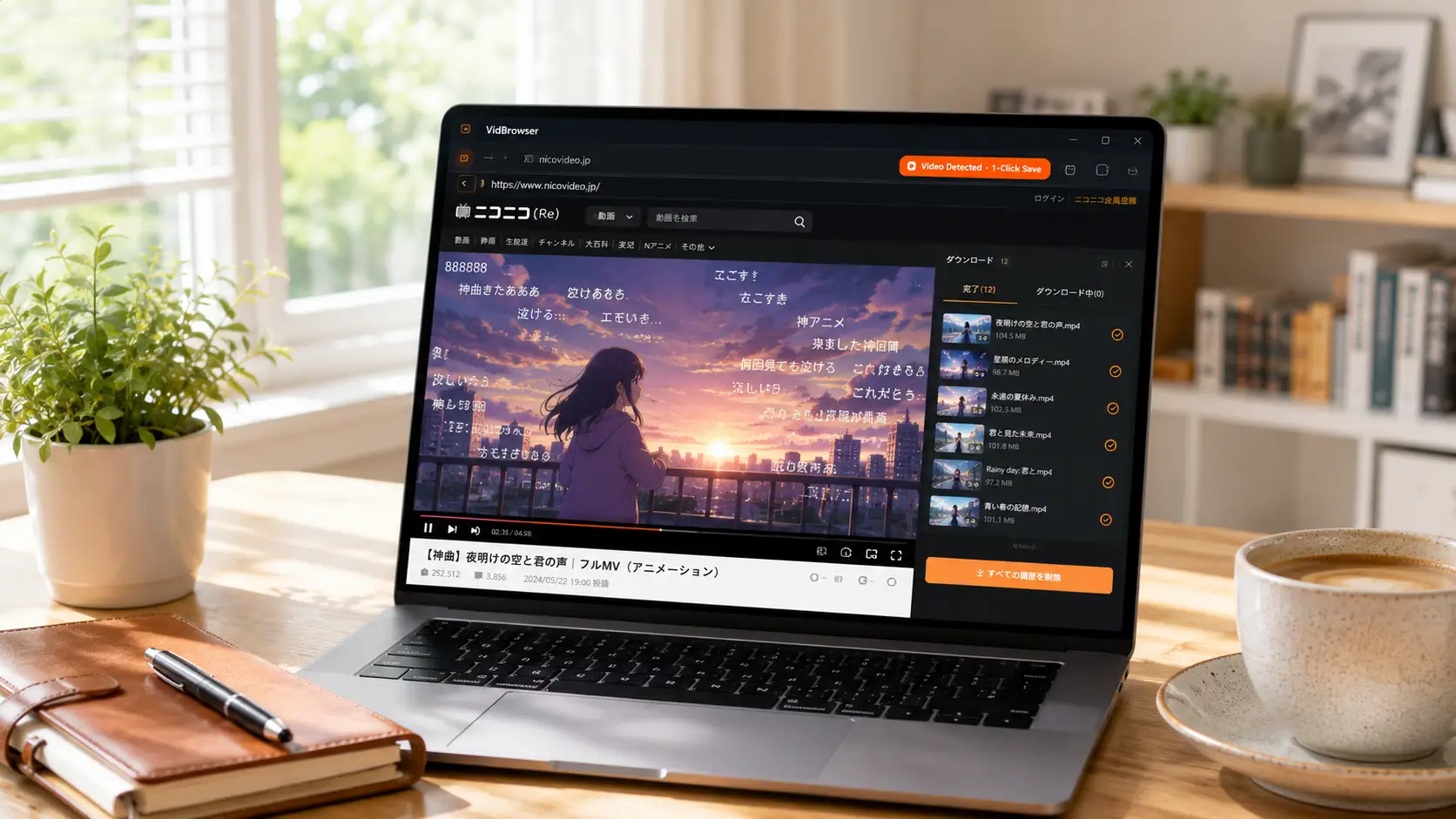
VidBrowser is a desktop browser built for video, available on Windows and Mac. Open nicovideo.jp normally, log in with your account (needed for login-only content), and play the video you want to save. Once playback starts, an orange one-click save badge appears in the top-right corner — click it and the video is saved as an MP4 file.
It only takes a few steps:
Step 1: Download and install VidBrowser
VidBrowser is a desktop video browser for watching videos, clipping segments, and saving them locally on Windows and Mac. Installation takes just a few minutes.
Step 2: Open Niconico in VidBrowser and log in
Launch VidBrowser, go to nicovideo.jp, and sign in with your own account as usual. Login-only content only appears and plays after you're signed in.
Step 3: Play the video you want to save
Open the target video page and let it play for a few seconds. VidBrowser automatically detects video resources on the page in the background, and once it identifies a saveable video stream, it lists it in the Video Media Library panel on the right.
Step 4: Save from the right-side Video Media Library
Once playback starts, the Video Media Library panel on the right side of VidBrowser automatically lists all videos detected on the current page, each with an orange Download button. Click Download on the video you want and it's saved as an MP4 file containing the original stream — no re-encoding.
Step 5: Find the files in your media library
When saving is done, you can open the file from the folder you selected, or find it in VidBrowser's download history. After that, watch it offline anytime with compatible players like VLC or QuickTime.
One Bottom Line to Remember
Niconico videos are copyrighted to their uploaders, and Japan's copyright system is quite strict. Saving them for your own offline viewing or personal reference is fine; republishing, reposting, or commercial use is infringement. For login-only and paid content, saving is only justified if you already have viewing permission — don't try to bypass the paywall.
FAQ
Will saved Niconico videos include danmaku?
No. Danmaku is comment data overlaid during playback and exists independently of the video file, so what you save is the clean original footage. If you need a danmaku version, you'd have to record it separately during playback, and the recorded quality will suffer.
Can I download paid and member-only videos?
As long as you can log in and play them normally, you can save them. The barrier for paid content is "whether you can watch it" — if you can see it, you can save it. But please respect the paywall: saving is only justified if you're already a paying user.
Will downloading Niconico videos notify the uploader?
No. Niconico has no download notification mechanism. VidBrowser saves videos to your local device and never sends any save record to the platform.


