
Your Streamer Moved to Kick - Can You Still Keep the Replays? Save While Watching
In recent years, a lot of streamers have moved from Twitch to Kick — bigger revenue splits, less platform interference, with top names like xQc and Adin Ross broadcasting there. You follow your favorite streamer to the new platform, only to find Kick's viewer side has no download button either: the stream is gone once it ends, and you can only stare at the screen if you wanted to keep it.
This article explains Kick's archiving rules clearly, and the methods viewers can actually use in 2026.
Kick and Twitch Aren't the Same, and Their Archiving Logic Differs
Kick is a live streaming platform launched in 2022. With its "95/5 split" (streamers keep 95% of subscriptions and tips), it has pulled a wave of creators away from Twitch and is investing heavily in sports and combat event streaming. Its open strategy attracts streamers, but viewers' saving rights haven't become more relaxed:
- There's no official download button on the viewer side — neither the web version nor the app has a "download this stream" entry.
- Whether there's a replay after the stream and how long it's kept is decided by platform rules and streamer settings — ordinary viewers have no say.
- Streamers can clip their own broadcasts into highlights, but that's the streamer's own choice — it doesn't mean you can get the original file.
So don't count on "the platform will keep it for me" — if you want an archive, you have to do it yourself.
Why Archiving Is So Hard for Viewers
- No official entry: Kick's download permission isn't in viewers' hands — same as Twitch, just that many new viewers hit this for the first time.
- Generic downloaders can't hold the stream: live streams are delivered in real time over HLS segments, many generic downloaders have poor support for such streams — mid-stream drops and incomplete files are common.
- Waiting for the replay is too passive: even if the platform keeps a replay, whether the streamer opens it for viewing is another matter; the safer approach is grabbing the stream while it's live.
How VidBrowser Saves Kick Live Streams
The idea stays the same: let the browser save the live stream it's playing while you watch.
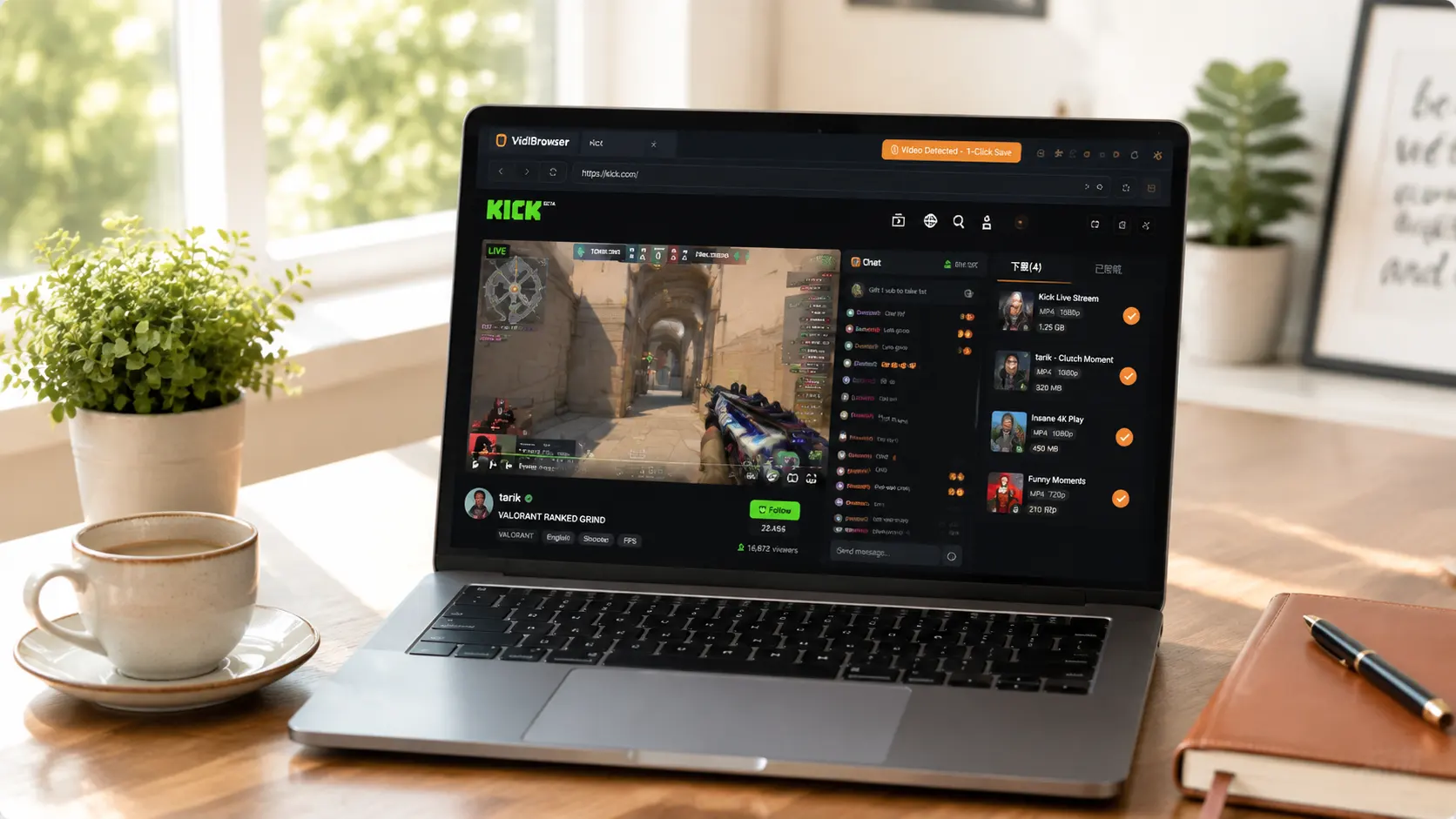
VidBrowser is a desktop browser designed for video, supporting Windows and Mac. Open kick.com normally and enter a live channel; once the stream starts playing, an orange one-click save indicator appears in the top-right corner — click it, and the live stream you're watching is saved as an MP4 file.
It takes just a few steps:
Step 1: Download and Install VidBrowser
VidBrowser is a desktop video browser for watching live streams and videos, trimming clips, and saving them locally on Windows and Mac. Installation takes just a few minutes.
Step 2: Open Kick in VidBrowser and Log In
Launch VidBrowser, visit kick.com, and log in with your own account as usual. After logging in you can watch streams and chat normally, which also makes saving easier.
Step 3: Enter the Channel You Want to Archive and Let the Stream Play
Enter the live channel and let the stream play for a few seconds. VidBrowser automatically detects video resources on the page in the background; once it identifies the live stream, it lists it in the "Video Library" panel on the right.
Step 4: Save from the Video Library on the Right
Once playback starts, the "Video Library" panel on the right lists all videos detected on the page (live streams, HLS, M3U8, and more), each with an orange "Download" button. Click the "Download" button of the video you want and it saves as an MP4 file containing the original stream, with no re-encoding.
Step 5: Find the File in Your Library
After saving, you can open the file from the folder you chose, or find it through VidBrowser's download history. Then watch it offline anytime with compatible players like VLC or QuickTime.
Saving Isn't the End: Highlights, Clipping, and Library Management in One App
Saving is just the first step. In the same software, the Kick streams you saved can keep working for you:
- AI highlight detection: hours-long streams are too long — AI automatically marks the best moments, so you don't have to scrub from the start.
- Built-in clipping: trim segments right in the browser and save a separate copy — for example, keep only the streamer's classic plays or key rounds of a match.
- Library management: stream files are automatically filed into the media library, with search, tagging, and sorting — no mess no matter how much you save.
- Offline viewing anytime: saved files are local MP4s that don't depend on Kick's account or network — streamers deleting streams won't affect them.
One Bottom Line to Remember
The visuals, music, and commentary in Kick streams each have their own owners. Saving them for personal offline viewing or personal study is fine; republishing, re-uploading, or commercial use is infringement. Save for yourself and respect the content creators.
FAQ
How long are Kick live stream replays kept?
The retention rules are decided by platform and streamer settings — viewers have no stable "permanent replay" guarantee, so don't pin your archiving hopes on replays. Saving during the live stream is the safest way: the file is already on your device before the stream even ends.
Will saving a Kick stream notify the streamer?
No. Kick has no notification mechanism for stream saving. VidBrowser saves the video to your local device, sends no save records to the platform, and doesn't affect your account.
If a streamer broadcasts on both Twitch and Kick, can I save from both?
Yes. Both platforms deliver streams through the browser, so the same process (log in, play, click download) works for both — just keep an eye on Twitch's replay expiry issue.


