
The Page Loads It; the Rules Decide What You Keep
VidBrowser has just added image batch download to its Tools page: paste a page address and the browser lists every image that page loaded, with format and size filters, so a whole gallery comes down in one pass instead of forty right-clicks.
The interesting question is not how it works, but which uses hold up. The names that send most people looking — Piccoma, Tapas, Manga Plus, FAKKU — get the same treatment here as any other source: by category, not by exception. Four categories hold up. Three do not, whatever a tool can reach.
Batch Changes What You Are Doing, Not Just How Fast
Saving one image is browsing; saving a page of them is copying a set, and three things shift with the scale. The pattern you leave is the first: someone moving through a gallery produces a rhythm a server reads as browsing, while forty requests inside a few seconds is a different rhythm, and the answers range from a slow-down to a refused request. Personal use is the second — that argument thins as the quantity grows and stops once a file leaves your device, as how those three rules stack sets out. The third is the one people miss: nobody opens forty files one by one, so whatever they carry travels unchecked.
Four Kinds of Images That Hold Up, and the Condition Inside Each
Four sources hold up: work you made, work that is out of copyright or openly licensed, work you licensed for use, and collections whose own rights statement allows it. Each carries one condition, and that is usually where the trouble starts.
- Work you made. Confirm authorship and your contract, because making something is not the same as being free to publish it: a shoot done on someone else's payroll, or a commission with a signed transfer, can leave the copyright elsewhere while the files sit on your drive. A recognisable person in the frame is a separate permission again.
- Out of copyright, or openly licensed. Confirm the licence line or public-domain statement on the item itself. Creative Commons runs six main licences plus CC0: attribution is the floor of all six, NC limits reuse to purposes "not primarily intended for or directed towards commercial advantage or monetary compensation", ND rules out adaptations, and SA requires the same terms on your version. Expiry is counted per country: in the United States, life plus 70 years, or 95 years from publication for anonymous and work-for-hire material, while Japan moved from 50 to 70 years after the author's death on 30 December 2018. The same work can be free in one country and protected in another.
- Work you licensed. Confirm the licence tier, not the receipt. Stock material is tiered, and the higher tier is what commercial products usually need. Downloading the largest version a page serves does not widen anything.
- Institutional open access. Confirm the rights statement on the individual item. The Met publishes more than 492,000 images of public-domain works under CC0 for unrestricted use, and the Smithsonian and the National Gallery of Art run comparable programmes — but open access means different things in different buildings. Some release only low-resolution files, some limit use to research, and some quote commercial rights separately. The institution is not the permission; the line under the image is.
Three Kinds to Leave Alone
Three categories stay closed whatever a page will load: serial content sold as reading access, anything carrying access control or a traceable mark, and anything headed for redistribution.
- Serial content sold as reading access. Coins, subscriptions and ink buy the right to read under platform rules, not a copy to keep — the difference is the whole subject of the access-versus-ownership side of those three apps. Where a catalogue is sold that way, saving was never part of the agreement. Japan moved the question out of the grey zone as well: since 2021, downloading infringing material while knowing it to be infringing carries penalties even inside personal use, and the exception is narrow — a panel or a few panels, and not a chapter. Why sliced pages resist saving covers the mechanism and the statute.
- Anything with access control or a traceable mark. Addresses bound to your session rather than to the picture, and marks rendered into the image itself and tied to the account that requested it. These are not hurdles to defeat; they are why the category is shut.
- Anything headed for redistribution, resale or a training set. The line between keeping and publishing is the moment a file leaves your device, and that is where personal use ends. An open licence does not rescue this one either: Creative Commons notes that much of how AI systems use content falls outside what its licences can govern.
Before You Press Download, Three Questions
Who made it, what did they grant, and what happens to the file next — those three settle almost every case.
Authorship comes first: a page usually shows whether you are looking at the creator's own upload, an official account, or a third party reposting someone else's work.
The grant is written down somewhere — in a footer, an About page, or beside the item. "All rights reserved" and "CC BY-NC" are both answers, and neither is a grey area.
Then decide what the file is for, because keeping a reference on your own drive and uploading it somewhere public are different acts. Where any of the three has no answer, that is the answer.
What Travels With an Image After You Save It
A saved image is rarely only pixels: it usually arrives with metadata — camera or device, capture time, editing software, sometimes a location fix, and a leftover thumbnail of an earlier version.
That matters more in a batch, because nobody inspects the files one at a time. Phone photographs are the usual source, and a location fix rides along with them. Files pulled from someone else's page carry the same baggage in the other direction. Downloading removes none of it, so the habit worth keeping is a look before a batch leaves.
How the Feature Works
Image batch download is five steps, and what it reports is what a page itself loaded. VidBrowser is a desktop video browser for Windows and Mac with download and recording built in, and the image tool sits alongside seven others under Tools:
Step 1: Install VidBrowser and open the Tools page from the left sidebar
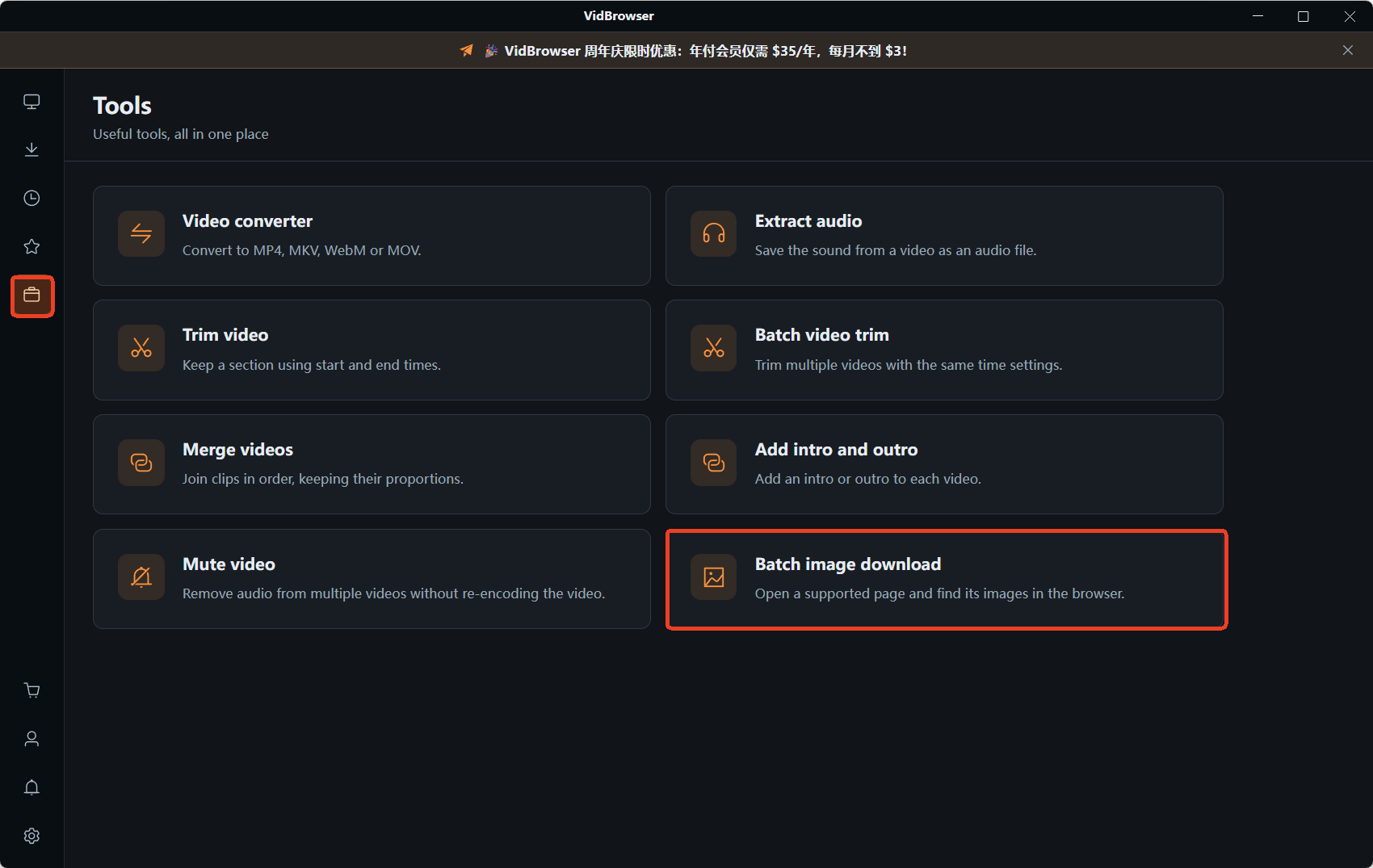
Step 2: Choose image batch download and paste the page address into the field
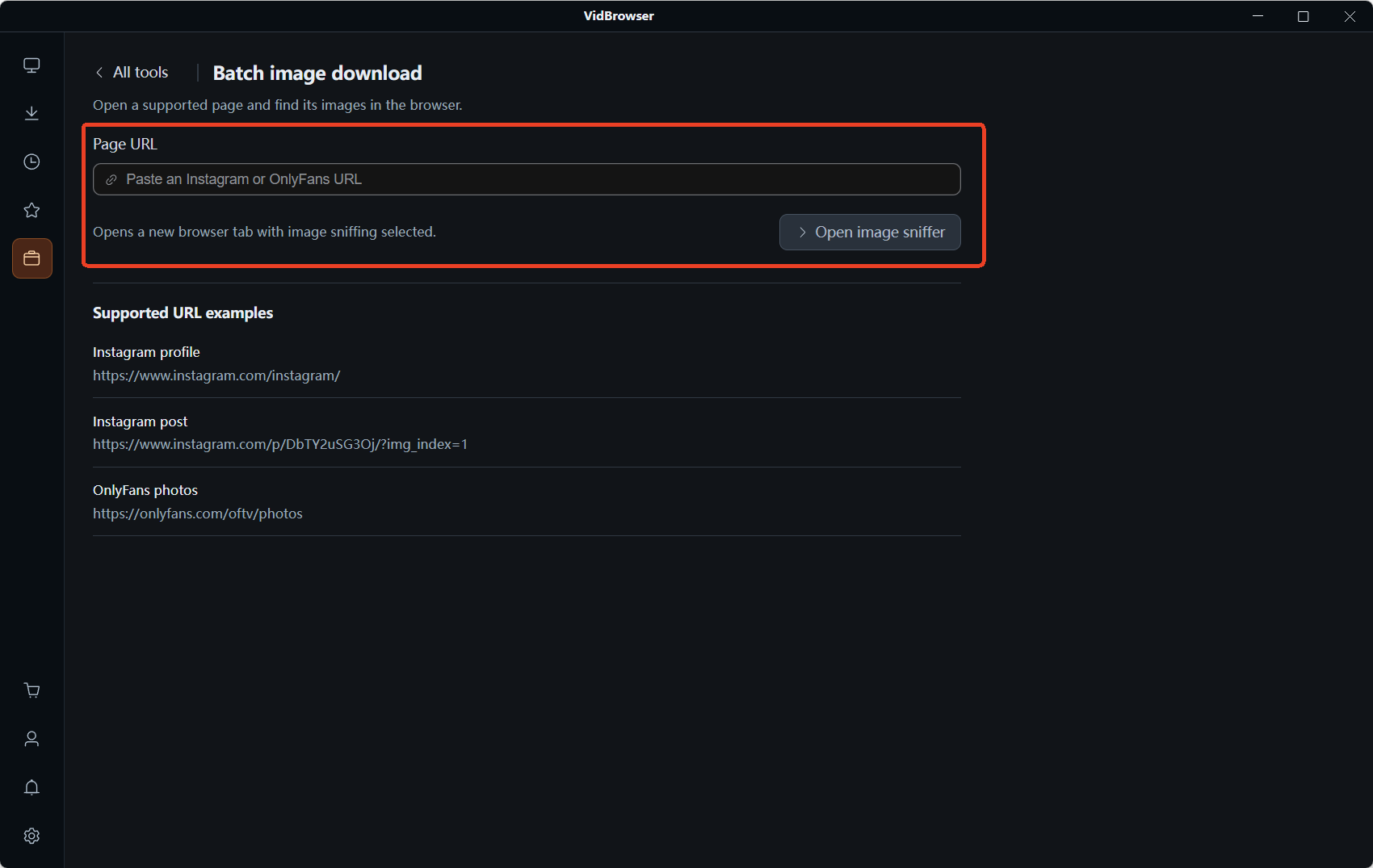
Step 3: Click "Open image sniffer" — the address loads in a new tab and sniffing starts on its own
Step 4: Read the "Image resources" panel on the right: a count of what it caught, split into Recommended and All, plus format and size dropdowns for clearing out icons and thumbnails
Step 5: Tick what you want, or select all, and send the batch Single cards keep their own download button
On a lazy-loading gallery the tool sees exactly what the site handed over, and no more. Video runs through the same browser: the Video Library panel on the right lists detected videos with an orange Download button, while protected content falls to the recorder — hover over the video and the recording controls appear on top, with 1x real-time, 2x or 4x to finish faster, and Record All for the whole thing. Finished files land in the download history on the left.
FAQ
Is it legal to batch-download images from a website?
It depends on the source, not on the tool. The terms you accepted decide whether saving is inside the deal, and copyright is a separate layer again. Work you made, work that is out of copyright, openly licensed material and licensed stock sit on the safe side; serial content sold as reading access does not.
Can I use Creative Commons images commercially?
Sometimes. CC BY, CC BY-SA, CC BY-ND and CC0 allow it; the two NC licences do not, since their wording limits reuse to purposes not aimed at commercial advantage or monetary compensation. Attribution is required by all six, ND blocks adaptations, and SA requires the same terms on anything you build from it.
Do I lose anything by saving an image instead of keeping a link?
You gain a copy and inherit its metadata. Links rot, pages get restructured and items get withdrawn, so a local file is the more durable choice for reference material — but it arrives with everything the file carries.


