
You topped up coins, paid for ink — so what did you actually get?
You have probably topped up coins on Piccoma, paid for a Manga Plus subscription, or burned through ink on Tapas without stopping to ask: what did that money actually buy?
Not in the vague sense of "entertainment." Literally: what shows up in your account after you pay, and what you may do with it. The three biggest platforms answer that differently, and none of them sells you a file.
Piccoma Coins: You Are Paying to Skip a Wait
Piccoma hands you a way to read for free, then sells you a way to stop waiting.
The free path is "Wait Until Free." Unlock a chapter and the next goes on a countdown — typically around 23 hours — before it opens free too. Read one chapter a day and the whole thing is free, indefinitely.
Coins are the other path: a separate currency bought in packs, spent to open the next chapter now instead of tomorrow. Larger packs cost less per coin, so the effective price of a chapter slides around with how much you have loaded up.
That explains two things readers find odd. There is no "buy the series" option and no subscription tier — only coins and waiting. It also explains the daily-login push: reading is free, but at a pace the platform sets, and coins exist to break that pace.
Points sit beside coins as a second balance, earned through events. Neither can be withdrawn or turned into anything you keep.
Manga Plus: Free Once, Then You Need a Subscription
Of the three, Manga Plus puts the sharpest limit on the same chapter: you get it free exactly once.
Shueisha runs it, which is why new chapters of its biggest titles land the same day they release in Japan. The free pattern is "first three, latest three" — the opening and most recent chapters stay readable.
The middle is where it gets interesting. Under the "First Read Free" system you read through them once each, at your own pace. Finish one and it locks — and that lock is not a timer. Waiting does not lift it, and it has nothing to do with how long you sat on the page. It closes when you close the reader, and reopening them means subscribing.
The platform treats a second read as a billable event — not a download, not a share, just looking at the same pages again. If reading twice is a new purchase, the idea that you hold your own copy falls apart quickly.
Subscriptions exist in a standard tier for ongoing series and a higher one adding completed classics. Two limits matter: the library is English-only, and the plans are not sold in Japan, China or Korea.
Tapas Ink: Two Balances With Two Different Rules
Tapas is the one platform of the three where bought money and gifted money behave differently — and most readers find out the hard way.
Ink unlocks episodes and supports creators. There are two kinds, identical in your balance:
- Regular ink — bought in the Ink Shop by card or PayPal. It never expires, and works both for unlocking episodes and for tipping creators directly.
- Bonus ink — earned from promotions, the gift box, invite codes or ads. It expires, sometimes within a day, and it can only unlock episodes. Per Tapas' own glossary, it cannot go to creators at all.
When you spend, bonus ink goes first. That ordering is not generosity — it is the platform retiring the balance that carries a deadline. So if your plan was to tip a creator, you need regular ink; no amount of bonus ink will do it.
And Tapas is where a copied page most obviously costs a person rather than a corporation. Most of its catalog comes from independent creators. They keep ownership of their work, take a 50% share of what readers spend unlocking episodes, and earn roughly 70% of ad revenue once a series passes 100 subscribers. That split is why its wait-until-free episodes exist: an ad view still pays the author.
Three Business Models, One Thing They All Sell
Coins, subscriptions and ink look different, but they sell the same unit: access, for a period, under platform rules.
Line them up side by side:
- Piccoma sells you time — coins skip a wait you could sit through free
- Manga Plus sells you repeat access — the same chapter is a new purchase the second time you open it
- Tapas sells you unlocks — and runs two balances where only one is really yours
What none of them sells is a copy. No purchase puts a file on your device, no balance converts into anything portable, and no tier makes the chapters stop depending on the app. That is not an oversight in the design. It is the design.
Where the Line Sits
The three platforms sell access. Reading permission and copying permission were never the same thing, and only one of them came with your purchase.
It is worth being precise: the line is drawn by the terms, not by taste. Saving chapters sits outside what you agreed to at sign-up — not a grey area, but something the agreement never included. That holds whether or not anyone notices.
Japan, where Piccoma leads the market and Manga Plus is publisher-run, went further than most. Since 2021, downloading manga you know to be pirated has carried penalties even within personal use — a phrase narrower than it sounds. Personal use stops holding the moment a file leaves your device.
So "can these pages be saved" has two halves: what the platform permits, and what the law treats as personal. Both were settled before any tool existed. The three layers behind content download rules takes that apart in more detail.
So What Is a Batch Image Downloader Actually For?
It is for images you are entitled to keep — your own work, open-licensed material, and assets you paid for.
VidBrowser is a desktop video browser for Windows and Mac, and its batch image downloader turns a page into a filterable list of its images. The whole routine:
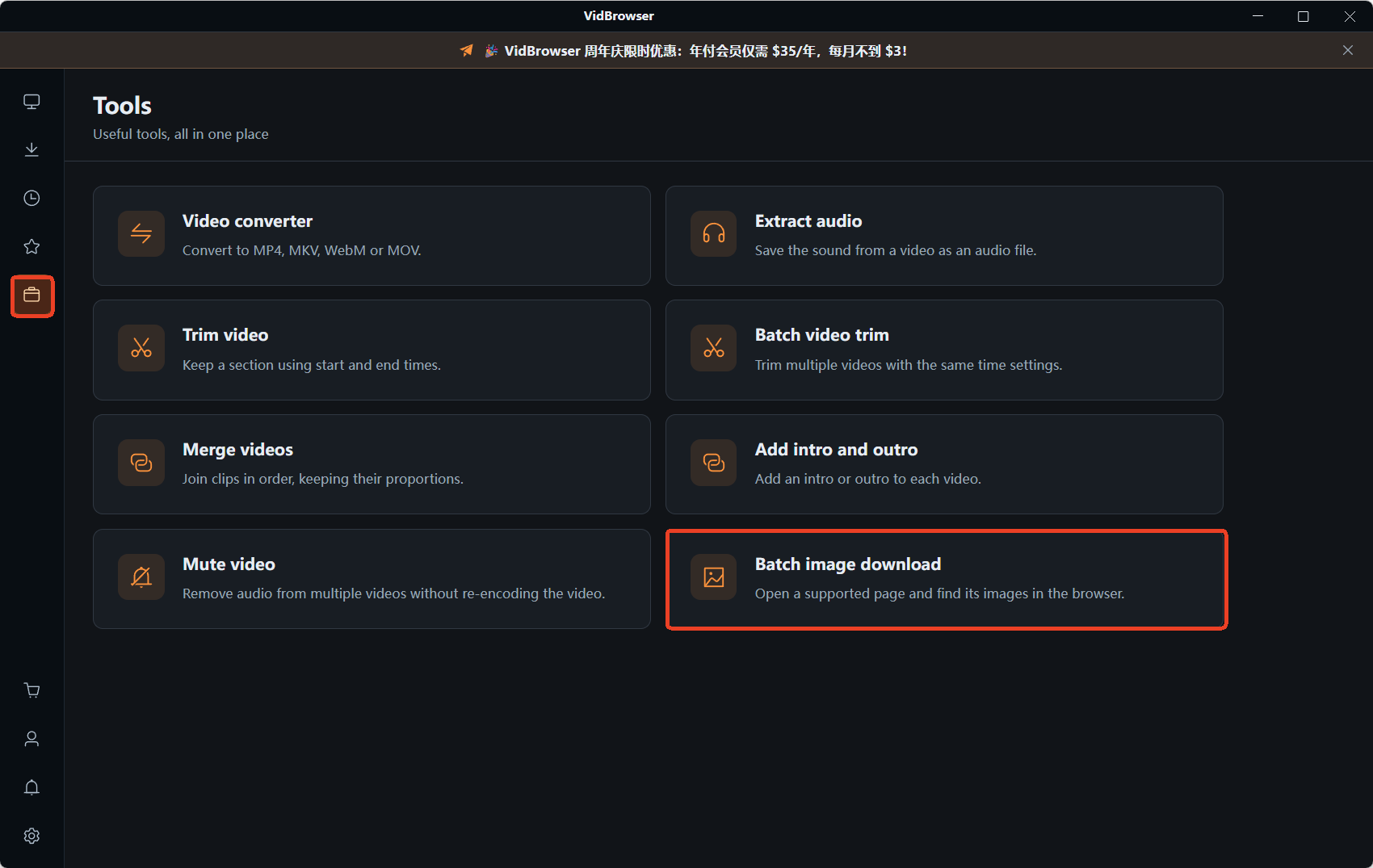
Step 1: Open the Tools page in the left sidebar and choose image batch download
Step 2: Paste the page address into the URL field
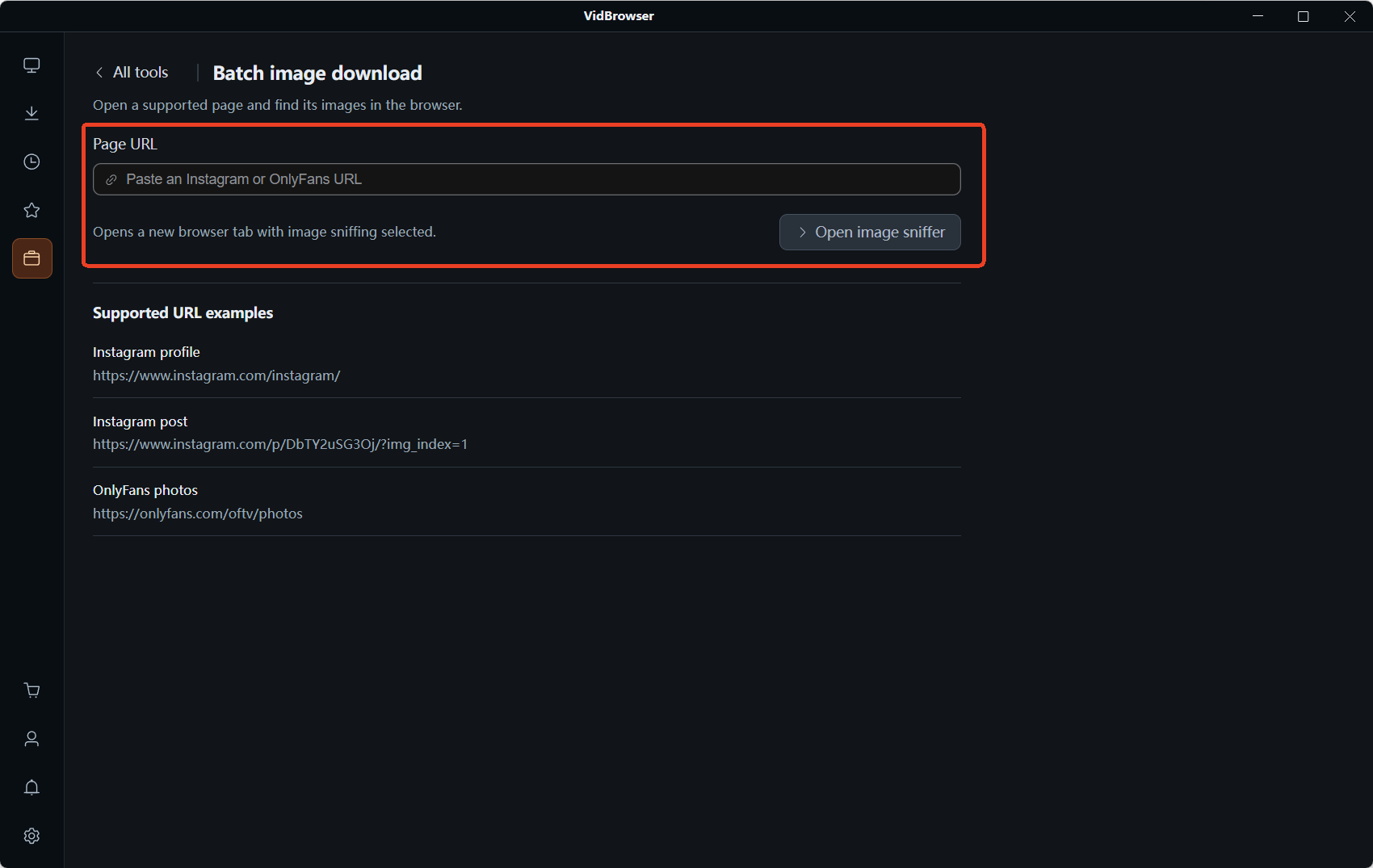
Step 3: Click "Open image sniffer" — the page opens in a new tab and the tool switches to sniffing mode
Step 4: Read the "Image resources" panel that slides out on the right. It reports how many images it caught and splits them into Recommended and All, so usable files are not buried
Step 5: Filter, tick, download The format and size dropdowns clear out small stuff in one pass. Tick what you want or select all, then send the batch. If you only need one, each card has its own button
The tool is not tied to a platform: it lists whichever images the page in front of you loads. Which page you point it at is your judgement call, and no tool makes it for you. The full walkthrough covers why right-clicking fails.
The uses it is built for:
- Your own uploads — pages you published, archived in one pass instead of hunted through folders
- Public domain and open-licensed comics — archive scans or Creative Commons releases put out for reuse
- Your own site or shop — product photos, illustrations and gallery images you control
- Licensed stock — images you bought with usage rights, pulled at the largest version the page serves
What it is not built for is pulling down other people's published work. That line does not move because a tool makes it easy.
FAQ
Can I download the chapters I have already paid for?
Not on the terms you agreed to. What you buy is access under their rules, and all three decide how content may be viewed. Access and ownership are separate things, and no tier grants the second.
Do Tapas bonus ink and regular ink expire?
Regular ink does not. Bonus ink does, sometimes within a day, and it can only unlock episodes — never support a creator. That is why you spend bonus ink first: it carries the deadline.
Which is the better deal — coins, a subscription, or ink?
It depends on how you read. Follow one series weekly and the free wait on Piccoma or Tapas costs nothing. Read widely on Manga Plus and a subscription beats paying chapter by chapter. Read one or two series and per-unlock spending is usually cheaper.


