
The chapter loaded perfectly — so why does everything you save come back grey?
You are forty chapters into a series, and three pages are worth keeping. You long-press. You save image. What lands in your gallery is a grey strip, or a thumbnail too small to read.
Nothing is malfunctioning. Manga readers hand pages out one screen at a time, under addresses that belong to your session rather than to the picture, each copy carrying a mark that points back to you. Then Japan's 2021 amendment arrives, and the question stops being technical.
This is the order it happens in.
A Chapter Was Never One Image
A chapter is not a file. It is a run of separate image requests, and most happen only because you scrolled to them.
Open a chapter and watch what the reader actually fetches. A long-strip webtoon panel can run past 10,000 pixels tall, and mobile decoders will not hold art that size, so the platform cuts it first — slicing a tall panel into vertical bands and streaming them in sequence. A page-by-page manga does the same with pagination: fifteen pages, fifteen requests.
That is why a single saved file so rarely matches the page you were looking at. You are not saving "the page" — you are saving whichever band sat in front of you, at the size the reader chose to serve your window.
And you only receive the parts you have already reached. Off-screen images are not requested until they near the viewport — the loading="lazy" behaviour documented by MDN lets a reader pull in a chapter's worth of art without paying for all of it up front. Right-click early and you save the placeholder, which is why so many "saved" pages turn out to be a few grey pixels. The general web version of that problem — responsive sizes, early right-clicks, CDN re-encoding — is in why saving web images is harder than it looks.
The Address Belongs to Your Session, Not to the Image
The address you copy is issued for your login, not for the picture. Open it without that session and the server has no reason to answer.
Readers that log you in do not serve art from an open directory. Every request carries a session and a referring page, and the answer is tied to both. Two things follow.
The same panel gets a different address in a different session, because the address never identified the panel — it identifies the delivery. Paste it into a fresh browser, with no login and no referring page, and the request is refused. Same family of control as hotlink protection, applied to licensed art.
That also explains a detail readers find baffling: a link that worked a minute ago stops working. The file has not moved. The permission attached to it has.
The Mark That Points Back to You
Video is protected by refusing to open. Manga is protected by knowing who opened it — a copy can carry an identifier tied to the account that requested it.
The distinction worth holding, because it explains why the machinery is this heavy.
A subscription video's segments are encrypted: the bytes are useless without a key handed out during playback and bound to the device. A manga image cannot work that way. It has to reach the browser as something the browser can decode and draw, and it stays that way. Why video resists saving is the same question from the other direction.
So the protection moves to traceability. Platforms can render a mark into the image itself, tied to the requesting account, and it survives whatever happens to the file. Capture-blocking exists too — the Android flag that blanks screenshots, the iOS overlay — but industry system-design literature is blunt that it "works imperfectly", which is why watermarking carries the weight.
None of that is the reason a plain save fails. It is the reason a save is neither anonymous nor free.
What Japan's 2021 Amendment Actually Changed
On 1 January 2021, downloading infringing content while knowing it to be infringing became illegal in Japan even within personal use — and the scope moved from music and video to all copyrighted works, manga included.
Japan had treated personal downloading of pirated music and video as punishable since 2012; the 2021 amendment added the rest of the catalogue. The fine print does more work than the headline:
- The new ground sits in Article 30, paragraph 1, item (iv) — the personal-use exception simply stops covering downloads of infringing content
- The penalty is in Article 119, paragraph 3, item (ii): up to two years, or a fine of up to two million yen, or both
- When it bites is narrower than it sounds: the criminal route needs an authorised edition sold commercially, and the downloading to be repeated or ongoing
- Knowledge is the trigger. Serious carelessness — not knowing despite obvious signs — does not qualify, and the offence requires the rightsholder to file a complaint
- Four carve-outs survive: trivial extracts, derivative and parody works, special circumstances that do not unfairly harm the rightsholder, and images incidentally caught in a screenshot
That first carve-out draws the eye, because "trivial" is defined against manga directly: a panel or a few panels, never a chapter. Those exceptions exist to keep ordinary use safe — a screenshot with someone's avatar in the corner. They are a floor under normal behaviour, not a way through.
The backdrop explains the haste. Per the Japanese government's own public-information page on the amendment, one defunct piracy site alone was estimated to have put roughly 300 billion yen of publications into free circulation. The law was drafted against that scale, and treats downloading as part of the problem. The wider three-layer picture — terms, technical protection, copyright — is in our breakdown of content download rules.
Where Image Saving Actually Belongs
A batch image downloader is for images you are entitled to keep, and its limits are the mechanisms above — not a setting you can flip.
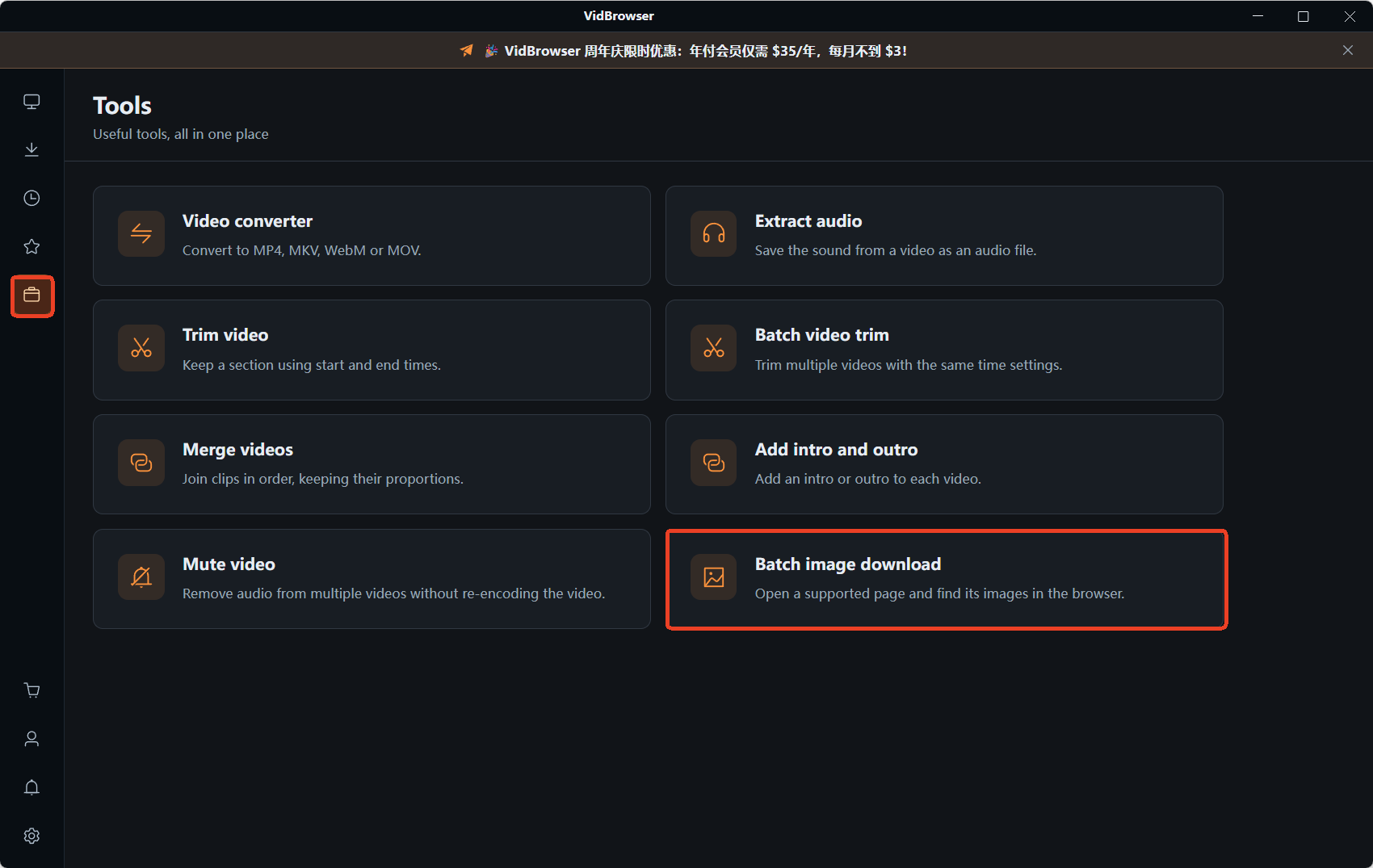
Given all of the above, it is worth being precise about what such a tool does. VidBrowser, a desktop video browser for Windows and Mac, scans a page and lists the images that page actually loaded:
Step 1: Open the Tools page in the left sidebar and choose the image downloader
Step 2: Paste the page address into the URL field
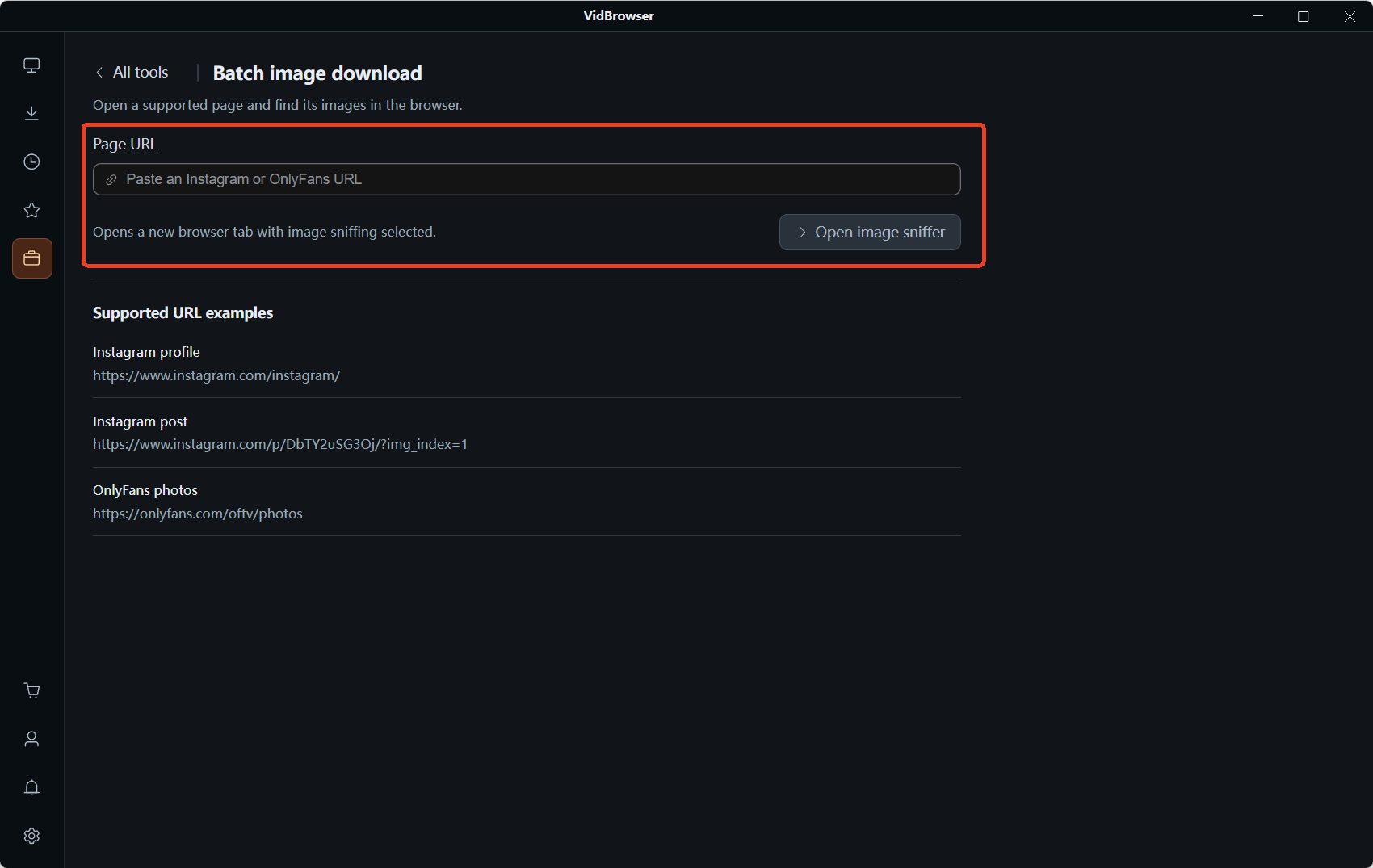
Step 3: Run the sniffer — the "Image resources" panel reports what it caught, split into Recommended and All, with format and size filters to clear out the small stuff
Step 4: Tick what you need, or select all, and send the batch
Note the wording: it lists what the page loaded. On a lazy-loading reader that is exactly what the reader gave you, and no more. The tool reads the page; it does not get around the page. That leaves the material you are entitled to keep:
- Your own uploads — pages you published, archived in one pass
- Public domain and openly licensed comics — archive scans or Creative Commons releases
- Your own site or shop — product images, illustrations and gallery art you control
- Licensed material — images bought with usage rights
What it is not built for is pulling down someone else's published work. That line does not move because a tool makes it easy.
FAQ
Why do saved manga images come out blurry or blank?
Usually because you saved the placeholder. Readers load art only as it nears the viewport, so anything you have not scrolled past was never requested. What looks like a broken save is the site's own bandwidth saving.
Can I keep pages from an official manga app?
The terms and the law are separate questions, and both point the same way. What you buy is access under the platform's rules, and Japan's 2021 amendment makes knowing download of pirated content punishable even inside personal use. What coins and ink actually buy covers the access-versus-ownership side.
Do watermarks really matter if I never share the file?
They decide whether a copy is traceable, not whether it is allowed. A mark tied to your account travels with the file, so a save is neither anonymous nor consequence-free — a different question from whether keeping it is legal.


