
Rumble Video Download Is More Relaxed Than YouTube: Save Videos Without a Button (2026)
You find a documentary or interview on Rumble you want to save — some videos have a download button on the page, one tap and it's yours; more videos have no button at all, and the web version has no save entry either. Unlike YouTube's strict "no downloads allowed" policy, Rumble's download rules are much more relaxed — but "relaxed" doesn't mean every video has a download button.
This article explains how Rumble's download policy actually works, and the methods that really work in 2026.
Rumble's Download Policy: More Relaxed Than YouTube, But Buttons Aren't Guaranteed
Let's start with the conclusion: Rumble's official policy is far more download-friendly.
- Rumble has no DRM. Videos on the platform are essentially free of digital rights management (for how DRM specifically affects video downloads, see our DRM explainer) — unlike Netflix or Disney+, which lock their streams with encryption.
- The download button is up to the creator. Rumble lets creators enable "allow downloads" in their dashboard — when enabled, a download button appears on the video page; when not, there is none.
- Creators can also export original files. Rumble supports creators exporting their own uploaded original video files for backup, which many platforms don't offer.
So you'll typically run into two situations: the creator enabled downloads and the page has a button; or they didn't and the page has nothing. And the second case doesn't mean the video itself can't be saved.
Why Videos Without a Button Can Still Be Saved
Rumble content plays in the browser, and the video stream is transmitted to your device during playback. Rumble has neither DRM encryption nor YouTube's complicated streaming restrictions, which leaves room for saving: as long as a video plays normally in your browser, the stream is right in front of you — save it, and you get a local file with original quality and no watermark.
That's the essential difference from YouTube — YouTube's policy is "banned across the board", while Rumble is "let creators decide".
Common Pitfalls When Saving Rumble Videos
- Mobile app limitations: in the Rumble phone app, some videos don't show a download option, and what the app saves can sometimes only be watched inside the app. For a stable file on your computer, the desktop is the way to go.
- Online download sites: Rumble's stream structure is relatively simple, but many parser sites are mainly built for YouTube, their Rumble support is unstable, and file quality varies.
- Screen recording: recording re-captures the picture and degrades quality — recording 4K content basically wastes the original quality.
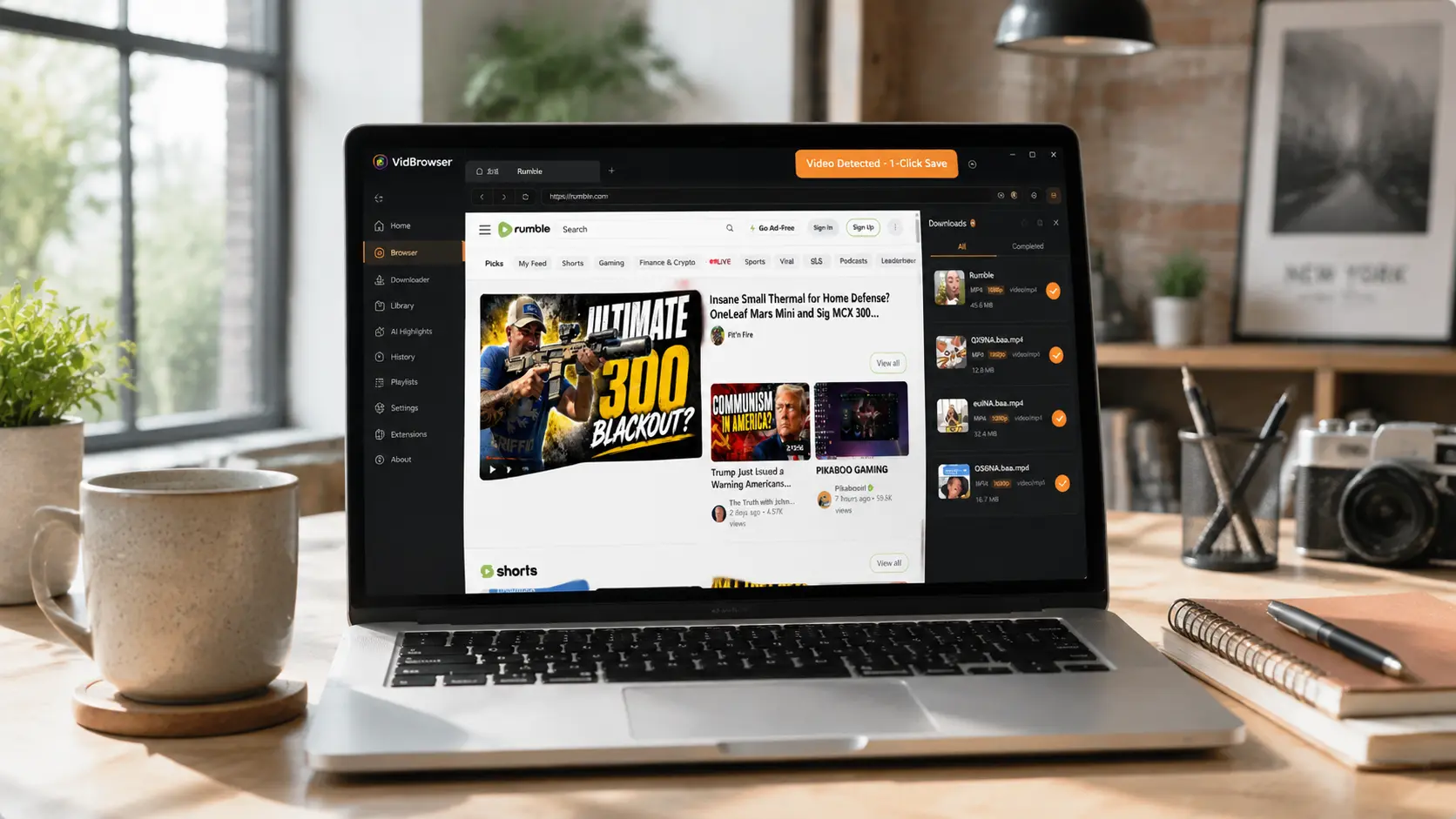
How VidBrowser Saves Rumble Videos
The idea is the same as always: let the browser save the video stream it's playing while you watch.
VidBrowser is a desktop browser designed for video, supporting Windows and Mac. Open rumble.com normally and play the video you want to save; once playback starts, an orange one-click save indicator appears in the top-right corner — click it, and the video is saved as an MP4 file.
It takes just a few steps:
Step 1: Download and Install VidBrowser
VidBrowser is a desktop video browser for watching videos, trimming clips, and saving them locally on Windows and Mac. Installation takes just a few minutes.
Step 2: Open Rumble in VidBrowser
Launch VidBrowser and visit rumble.com. Public videos play without logging in; if your target video requires login, log in with your own account as usual.
Step 3: Open the Video You Want to Save and Let It Play
Go to the video page and let it play for a few seconds. VidBrowser automatically detects video resources on the page in the background; once it identifies a savable stream, it lists it in the "Video Library" panel on the right.
Step 4: Save from the Video Library on the Right
Once playback starts, the "Video Library" panel on the right lists all videos detected on the page (possibly including copies in different resolutions), each with an orange "Download" button. Click the "Download" button of the video you want and it saves as an MP4 file containing the original stream, with no re-encoding.
Step 5: Find the File in Your Library
After saving, you can open the file from the folder you chose, or find it through VidBrowser's download history. Then watch it offline anytime with compatible players like VLC or QuickTime.
One Bottom Line Before Saving Rumble Videos
Rumble videos belong to their creators under copyright, regardless of the platform's relaxed download policy. Saving for personal offline viewing or personal reference is fine; republishing, re-uploading, or commercial use is infringement. Save for yourself and respect the content creators.
FAQ
Can I still save a Rumble video that has no download button?
Yes. Rumble has no DRM — as long as you can play it normally in your browser, you can get the file by saving the video stream. Whether a button exists only reflects whether the creator proactively opened downloads, not whether the video itself can be saved.
Can Rumble videos be downloaded in original 4K quality?
Yes. What gets saved is the original video stream Rumble delivers to you — the same resolution you see when playing, with no re-encoding. The prerequisite is that you can play it in 4K (network and account permissions allowing).
Does downloading a Rumble video notify the creator?
No. Rumble has no download notification mechanism. VidBrowser saves the video to your local device, sends no save records to the platform, and doesn't affect your account.


