
Ko-fi Videos Worth Keeping: How to Save Member and Tip Content
You've supported a video creator on Ko-fi, paid your monthly membership, and sent your tips. One day you remember a member-only video you enjoyed and want to watch it again — but there's no download button anywhere on the page. You can only stream it online, and if the creator clears their content or closes the page, those videos are gone for good. Ko-fi is famous for "buying the creator a coffee," and many people think of it as just a tip page — but the videos on it deserve serious attention when it comes to saving them.
This article first explains what Ko-fi is, then covers where its videos live, why they're hard to save, and how to keep the content you've supported permanently in your own hands in 2026.
What Is Ko-fi? More Than Just "Buying Coffee"
Ko-fi launched in 2017 as a creator support platform; the name plays on "buy me a coffee." It competes with Patreon in the "fans support creators" space, but with a lighter, more flexible model:
- One-time tips: Fans can buy a creator a "coffee" anytime with no subscription commitment — this is Ko-fi's most common use.
- Memberships: Creators can offer paid memberships, giving members access to exclusive posts, videos, and content.
- Shop: Creators can sell digital products and physical goods directly — ebooks, asset packs, tutorial videos, and merch.
- Requests: Fans can pay for commissions, asking creators to draw, make videos, or write.
Creators span illustrators, podcasters, crafters, writers, cosplayers, and musicians — including video creators (Video Creators is one of the types officially listed on the site). There's no forced posting schedule; creators publish whenever they want — that relaxed feel is the biggest difference from Patreon.
Where Do Ko-fi Videos Actually Live?
Ko-fi isn't a video site; videos are "content units" scattered across different places:
- Member-only posts: After joining a membership, you can see creators' exclusive updates, and posts can include videos.
- Videos sold in the shop: Video products like tutorials, courses, and asset packs — downloaded or streamed after purchase.
- Tip reward content: Some creators send thank-you videos or bonus content to fans who tipped.
- Media attached to regular posts: Videos, clips, and previews creators attach when posting updates.
These videos come in different forms but share one thing: they all play in the browser, and the pages themselves don't offer download buttons.
Why Saving Ko-fi Videos Is Hard
- No official download option: Ko-fi gives fans "watch and interact," not video downloads — if you want to keep them, you have to figure it out yourself.
- Content can vanish at any time: Creators can delete posts, clear content, or even close their entire Ko-fi page overnight — the things you supported may disappear. This mirrors Patreon (see our Patreon video download guide).
- Membership lapses mean losing access: Once you stop paying, member-only content is immediately locked away; anything you didn't save is gone.
- Generic download tools are unreliable: Ko-fi content is scattered across pages, and online parser sites handle this structure poorly — they also ask you to send your links to a third party.
How VidBrowser Saves Ko-fi Videos
The idea is the same as saving videos from other platforms: while the browser plays the video, it captures the video stream being played.
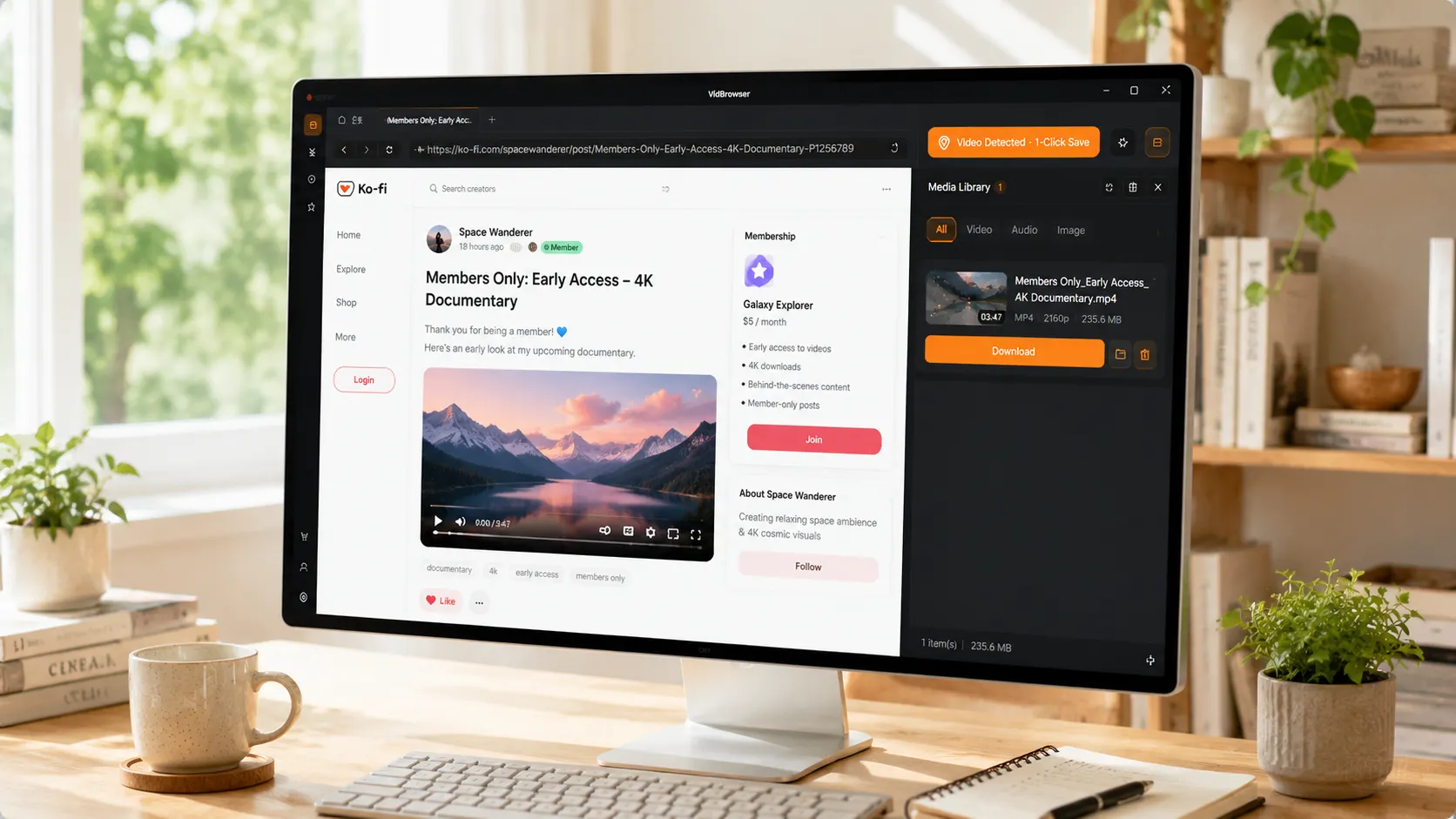
VidBrowser is a desktop browser built for video, available for Windows and Mac. Open ko-fi.com normally, log in to your account, and play the video you want to save. Once playback starts, an orange one-click save indicator appears in the top-right corner — click it and the video is saved as an MP4 file.
It only takes a few steps:
Step 1: Download and install VidBrowser
VidBrowser is a desktop video browser for watching videos, capturing clips, and saving them locally on Windows and Mac. Installation takes just a few minutes.
Step 2: Open Ko-fi in VidBrowser and log in
Launch VidBrowser, go to ko-fi.com, and log in normally with your own account. Member content is only visible to subscribed accounts, so you can play it once you're logged in.
Step 3: Open the video you want and let it play
Go to the creator's page, open a member-only post or a shop video, and let it play for a few seconds. VidBrowser automatically detects video resources on the page in the background and, once it finds a savable video stream, lists it in the "Video Library" panel on the right.
Step 4: Save from the Video Library on the right
Once playback starts, the Video Library panel on the right side of VidBrowser automatically lists all videos detected on the current page, each with an orange "Download" button. Click the Download button for the video you want to save it as an MP4 file with the original video stream, no re-encoding. You can also pick a resolution before downloading — choose a higher one for quality, or a lower one to save space.
Step 5: Find the file in your library
When the download finishes, you can open the file from the folder you chose, or find it in VidBrowser's download history. From there, watch it offline anytime with compatible players like VLC or QuickTime — no longer tied to the Ko-fi page or your membership status.
When You Should Save the Most
- Before your membership renews or expires: Save the videos you liked during the membership period, so you're covered whether you renew or not.
- When a creator posts frequently: More content means a bigger chance of cleanup — archive it while it's all still there.
- Special content: Limited tutorials, one-time stream replays, and custom perks — anything that won't come back is worth saving right away.
Saving is essentially turning the content you supported from "rented" into "owned" — the creator gets your support, you keep what you want, and both sides feel good.
One Bottom Line to Remember
Save only what you're entitled to see — membership videos require an active membership, and shop content requires a purchase. Saving for your own offline viewing or personal reference is fine; republishing, redistributing, or commercial use is infringement. Support creators and respect them.
FAQ
Can I download videos from Ko-fi?
Ko-fi itself doesn't provide a download button, but since videos play in the browser, you can click the orange download button while playing them in VidBrowser to save them as MP4 files that stay on your device for offline viewing.
Can I still watch saved videos after my membership expires?
Yes. Saved files are local files and have nothing to do with your membership status — membership controls platform access, while local files are independent, so stopping your subscription doesn't affect them.
Is saving videos from Ko-fi the same as from Patreon?
Fundamentally yes — both follow the play, detect, and save flow after logging in. The difference is how content is hosted: Patreon's video hosting is more complex (native, Vimeo, and YouTube embeds), while Ko-fi's content is more scattered across posts, memberships, and the shop. (For Patreon's detailed method, see our Patreon video download guide.)


