
Tried Every LoyalFans Downloader and None Work? It's Not the Tools — It's This
Type "loyalfans downloader" into a search engine and the results run the gamut: online parsing sites, browser extensions, command-line tools, download software of unknown origin — every one claims it can download LoyalFans videos. Try them one by one: either parsing fails, or you get an unopenable file, or worse, you're asked to log in and hand over your password. The tools aren't lacking — the vast majority simply don't work on LoyalFans at all.
This guide puts the four categories of LoyalFans downloader on the market to a real test: how each actually performs on LoyalFans, why they fail, the risks hidden inside, and the one approach that genuinely works.
What Are People Searching LoyalFans Downloader Trying to Solve?
Bottom line: people searching "LoyalFans downloader" want exactly one thing — to save subscribed creators' videos as local MP4 files, but nearly every tool on the market is useless against LoyalFans' content protection. First, unpack the three typical scenarios behind this search intent:
- Subscriber archiving: you paid to follow a favorite creator and fear content being deleted or lost when the subscription lapses.
- Replay rescue: a stream replay or limited content is about to expire — grab a copy while it still plays.
- Collection organizing: lots of saved favorites scattered across the platform, hard to manage — consolidate them into a local library.
The demand is reasonable, but understand one premise first: LoyalFans videos travel as encrypted streams with decryption keys bound to your login session — which is why most "universal" download tools are born broken on this platform. Armed with that context, much of the testing below makes instant sense. (For differences in saving difficulty across platforms, see our 5-platform comparison.)
Four Categories of LoyalFans Downloader: Real Test Results
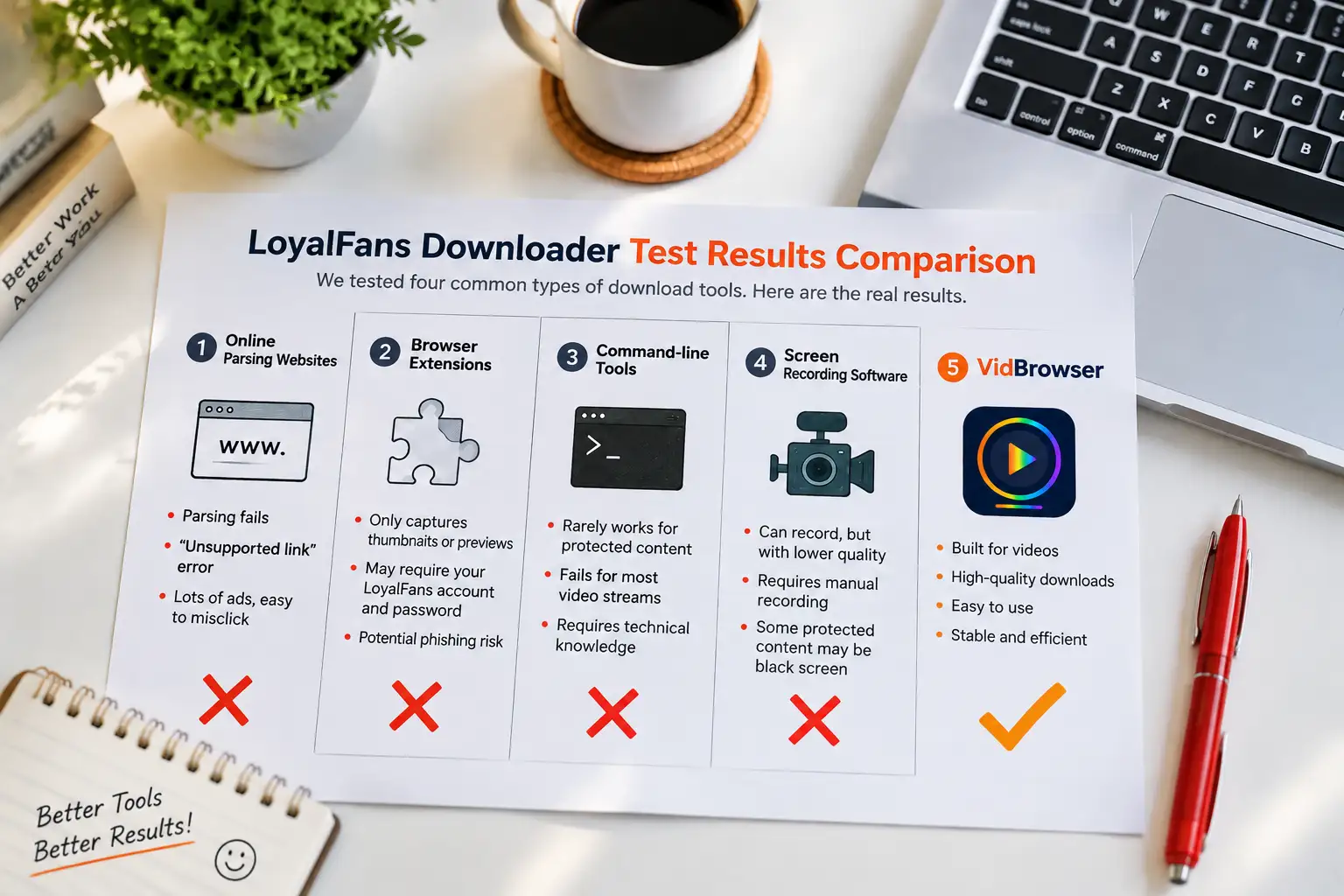
We sorted the self-proclaimed LoyalFans-capable tools into four categories and tested each in real scenarios. The outcome surprised no one — the first three categories fail close to 100% of the time:
- #1 Online parsing sites: paste a video link into a webpage. Actual performance: works for public platforms like YouTube, but essentially all fail on LoyalFans — either "link not supported," or the parse produces an unopenable few-KB file. Simple reason: the site gets encrypted data, and without your login session there's no key. Extra warning: these sites are ad-dense, and mistaking an ad disguised as a download button can bite you.
- #2 Browser extensions: Chrome's store carries no shortage of extensions calling themselves "LoyalFans video downloader." Actual performance: most capture only thumbnails or preview fragments; the rare ones claiming to work ask for your LoyalFans username and password — a textbook phishing move; once handed over, the account is gone.
- #3 Desktop command-line tools: open-source powerhouses like yt-dlp really are formidable, but protected LoyalFans content isn't in their officially supported sites list. Actual performance: unprotected media in ordinary posts occasionally succeeds, but protected video streams fail uniformly. Great for tinkerers; not for most people.
- #4 Screen recorders: OBS-style recorders can "film" anything. Actual performance: they do capture, but quality drops, you must babysit the timer throughout, and some protected footage comes out black — a terrible return on effort.
One-line verdict from testing: all four traditional routes collapse on LoyalFans — the root cause isn't tool quality but the content protection mechanism itself.
Worse Than Failed Downloads: The Security Risks Hiding in These Tools
A failed download only wastes time; what deserves sharper vigilance are the risks hiding behind tools that "seem to work." By common security-industry observation, third-party tools around subscription platforms are a phishing hot zone:
- Extensions demanding your password: any tool asking you to type your LoyalFans credentials directly should be dropped immediately — legitimate solutions always ride the browser's own login flow.
- Bundled software and malware: unknown-origin "downloader" installers often carry bundled promo programs or trojans; hijacked homepages and endless pop-ups are the mild symptoms.
- Privacy leaks: submitting a video link to an online parsing site hands your browsing trail to their server — whose content you watch and how much may be recorded and exploited.
- Fake downloads, real ads: nine out of ten "Download" buttons on parser pages are ad slots, with the genuine button tucked in a corner — one misclick can auto-download junk software.
The test has just one line: a solution requiring neither your account credentials nor installing software of unknown origin is the only safe starting point.
The Approach That Actually Works: A Browser Built for Video
After all four tool categories fall, what remains is ironically the simplest path: use a video browser with full built-in playback and complete the saving inside the browser itself. VidBrowser does exactly this — it's a complete desktop browser (Chromium core) where you log into LoyalFans normally, play videos normally, and obtain saveable content within the playback flow itself. Nowhere in the process do you submit links to any third party, grant extra authorization, or install extensions of unclear origin.
Step 1: Download and install VidBrowser
VidBrowser is a desktop video browser for Windows and Mac; installation takes minutes.
Step 2: Open LoyalFans in VidBrowser and log in
Launch VidBrowser, visit loyalfans.com, and log in normally with your own account. Your existing subscriptions and permissions work exactly as in a normal browser.
Step 3: Play the video you want to save
Open the target video and let it play a few seconds. VidBrowser automatically detects video resources on the page in the background; recognized saveable streams appear listed in the "video library" panel on the right.
Step 4: Save with the recording feature (first choice for protected content)
Most videos on subscription platforms like LoyalFans are copyright-protected and ordinary download tools can't grab them; VidBrowser's recording feature is the most reliable: hover over the video and recording controls appear as an overlay — pick a speed (1x real-time, or 2x/4x to finish faster), click "Record All" to capture the whole video, and the record button on the left starts or pauses at any time. Anything that plays can be recorded.
If the video can be downloaded directly, the right-side "video library" panel also lists entries with an orange "Download" button — one click saves as MP4 (resolution selectable first).
Step 5: Find the files in the library
After saving or recording, open files from your chosen folder or locate them via VidBrowser's download history. Watch offline anytime with VLC, QuickTime, or any player. (For complete operating details, see our LoyalFans video download guide.)
How to Choose: Conclusions by Scenario
- Just want to save a replay now and then: trying online parsers is understandable, but on LoyalFans it's mostly wasted time — going straight to VidBrowser saves effort.
- Long-term subscriber to multiple creators, regular archiving: VidBrowser is the only solid long-term plan, playing and saving in one place without swapping tools at every step.
- Care about account and data security: stay away from any tool asking for passwords — also the fastest way to eliminate most "LoyalFans downloader" options.
- Technically strong and love tinkering: command-line tools are worth studying, but be prepared — protected LoyalFans content is basically unbeatable by them.
The essence of choosing a tool isn't finding "the one with the most features," it's finding "the one that actually works on your platform" — in the specific scenario of LoyalFans, the only route that runs end to end is the video browser.
FAQ
Why do so many LoyalFans downloader tools online not work?
Because LoyalFans streams are encrypted with keys bound to your login session. External tools can't get the key, so what they parse out is naturally unplayable data — a mechanism problem, not poor craftsmanship.
Is saving LoyalFans videos with VidBrowser safe?
Yes. VidBrowser is a complete desktop browser riding your own login session; no third party receives account info or video links, and saving happens locally without notifying the platform.
Can free download tools work?
Free online tools are largely ineffective against protected LoyalFans content while carrying heavy ad misleading and security risks. Compared with the time cost of repeated trial-and-error plus malware risk, a proper browser solution done once is far more economical.
Will saving a video with VidBrowser notify the creator?
No. From the platform's and creator's perspective it's normal viewing — no save records or notifications sent, no effect on your account or subscriptions.


