
Free Limits Not Enough? 4K Video Downloader Alternatives Tested
If you have used 4K Video Downloader for years, you have probably noticed two things lately: the free quota keeps shrinking and ads have started appearing in the app. What worries long-time users even more is that the original app officially stopped receiving updates on February 1, 2026 — new features go only into the Plus edition, and existing "lifetime licenses" do not automatically carry over. That is why searches for "4K Video Downloader alternative" keep climbing. Before rushing to a ranking list, though, figure out which limit is actually blocking you — the answer changes completely depending on it.
4K Video Downloader Free Tier in 2026: The Real Limits of 30, 10 and 5
The free tier of 4K Video Downloader Plus is capped at 30 downloads per day, 10 items per playlist parse, 5 items per channel parse, and a single concurrent task — and ads appeared in the app starting with the Plus edition. These numbers define the ceiling of the free plan: saving a few public videos is fine, but batch-archiving a library means hitting the wall over and over (see the 4K Download official site).
According to the official 4K Download pricing page, paid plans split into three tiers: Lite around $15/year, Personal around $25 one-time and Pro around $45 one-time (prices vary slightly by channel), and paying does lift the limits. What truly upset loyal users was license migration — after the original app was discontinued, previously purchased lifetime licenses do not transfer, and third-party reviews report its Microsoft Store rating has fallen to 3.7/5. So before spending that money, answer one question first: is the content you want to save within reach of link-parsing tools at all?
Four Alternatives Compared: Who yt-dlp and JDownloader 2 Are For
There is no all-rounder among the alternatives: yt-dlp covers the most sites but requires commands, JDownloader 2 has the strongest batch queues but a cluttered interface, and Video DownloadHelper wins on convenience yet often tops out at 1080p. One by one:
- yt-dlp: open source and free, supports over a thousand sites, with fine-grained control over format, resolution and subtitles — the ceiling for power users. The cost is a command-line-only workflow, and you must keep updating it yourself whenever platforms change. The learning curve is steep for casual users.
- JDownloader 2: free with no download cap, strongest at batch links and queue management — ideal for throwing in a pile of links and letting it run. The drawbacks are just as clear: Java-based, installer must come from the official site, and the dense interface feels like an engineer's tool.
- Video DownloadHelper: a veteran extension for Firefox and Chrome that auto-detects videos as you browse. Some format conversions require a companion app, and in many scenarios the resolution caps at 1080p — disappointing if you chase high quality.
- Online parsing sites: zero installation, paste a link and go — but reduced quality, ad pop-ups and privacy concerns come bundled. Fine as a stopgap; not recommended as a daily driver.
Three Signals That the Free Quota Is Really Not Enough
Whether to switch tools comes down to three things: how many videos you save per day, whether you need channel backups, and whether the content requires login.
- Signal one: the 30-per-day cap runs out. People saving a dozen or so public videos a day never feel it, but anyone archiving material or moving videos weekly ends up rationing the quota by month's end.
- Signal two: playlists and channels get cut in half. Only 10 items per list and 5 per channel — backing up a collection of hundreds of episodes means moving them manually again and again. This is the most discouraging limit after the ads.
- Signal three: the content requires login. Every vendor's own documentation is clear about this: parsing tools, 4K Video Downloader included, do not handle encrypted or protected content, and yt-dlp cannot get around it either. This is not a weakness of any single product — it is the ceiling of the entire "paste a link and parse" approach.
The first two signals can be solved by paying or by switching to a tool with no caps. The third one defeats every tool on that list — unless you switch routes entirely, which brings us to a different category of product.
A Different Route: Save Videos as You Watch with a Video Browser like VidBrowser
A video browser is a different product route: instead of pasting links for parsing, you open the video page in the browser, download whatever is detected, and fall back on recording for whatever is not. For the content parsing tools cannot touch, this is the way through.
It takes just a few steps:
Step 1: Install and open VidBrowser
VidBrowser is a desktop video browser for Windows and Mac with built-in downloading and recording. The free plan allows 5 downloads per day and recordings up to 5 minutes each, and you can keep using it without paying.
Step 2: Open the video page inside VidBrowser
Type the address, log in and play the video as usual — no different from a regular browser.
Step 3: Choose download or record based on the content
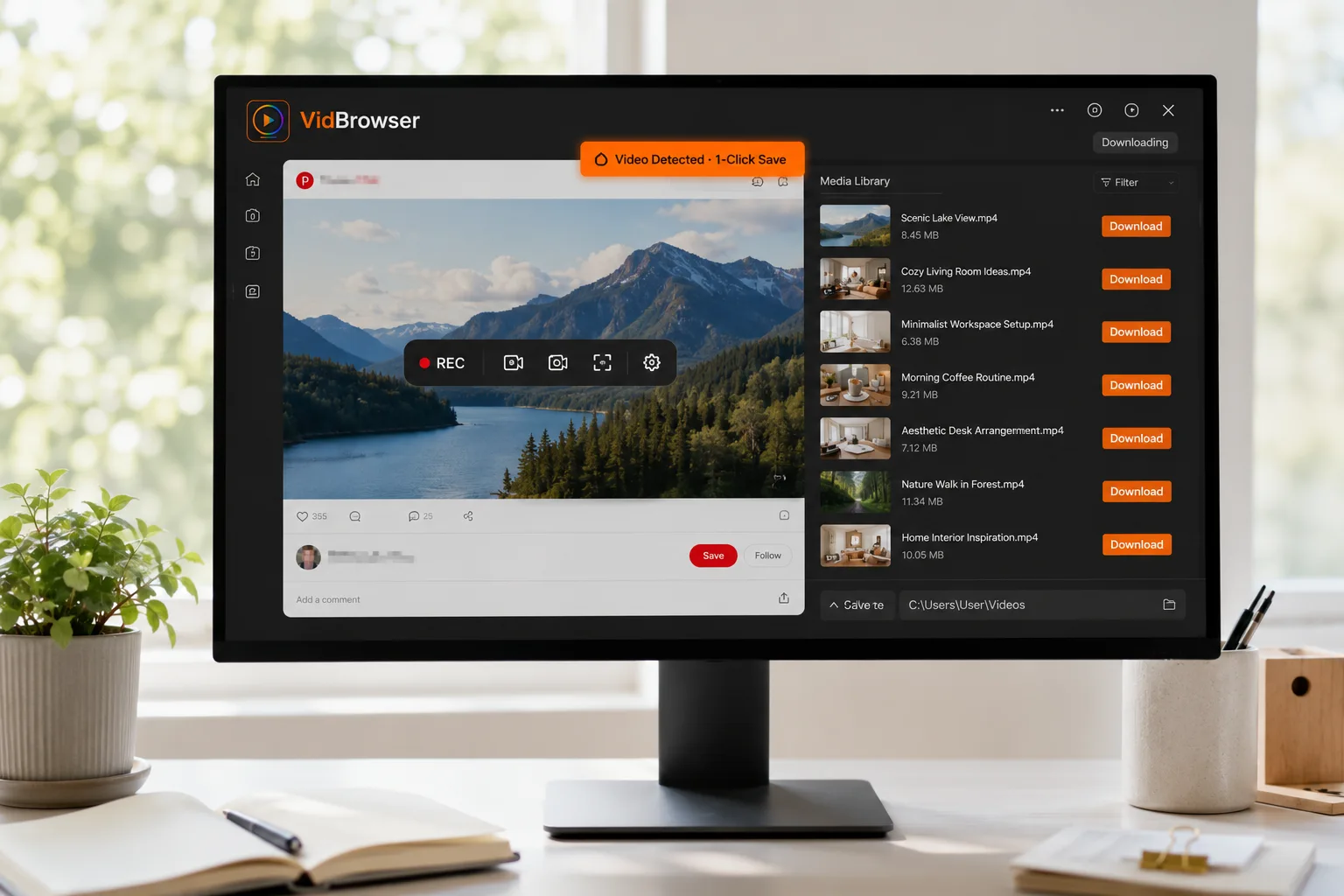
The "Video Media" panel on the right lists detected videos; pick a resolution and hit the orange "Download" button to save as MP4. For protected content or live streams that cannot be detected, hover over the video to bring up the recording controls, choose 1x realtime, 2x, or 4x to finish faster, and click "Record All" — the record button on the left can pause at any time.
Download history is always available under "History", and frequently visited pages can be bookmarked so you never dig through system folders again. For the full recording workflow, the in-site guide Video Record & Download Guide covers it in more detail.
Choose by Usage Pattern, Not by Price
The real decision factors are usage frequency and content type — not whose interface looks nicer. Find your row:
- A few public videos per week: the 4K Video Downloader free tier or an online site is honestly enough — no need to over-engineer.
- Daily saving plus channel backups: fix the quota first; yt-dlp or JDownloader 2 with no caps is more practical.
- Live streams and login-only content: recording is the only dependable route — go straight to a video browser with recording built in.
- Quality ceiling: whether you can get 4K or even 8K depends on what the page actually serves; the mechanics are covered in the in-site article on YouTube 4K quality.
Still undecided? The in-site full comparison of video download tools breaks down five categories of tools by scenario — reading it alongside this article makes the choice clearer.
FAQ
Can I keep using the 4K Video Downloader free version?
Yes. The original app only stopped feature updates; installed versions still run. But tighter quotas, in-app ads and slower platform adaptation are the trend — heavy users should plan a replacement sooner rather than later.
Are tools like yt-dlp risky?
The tools themselves are open source and legal; the risk lies in usage. Only save content you have permission to watch, for personal collection only — never redistribute or resell. And always download from the official GitHub; third-party repackaged installers are frequently tampered with.
Which free alternative feels closest to 4K Video Downloader?
For a graphical interface with no download cap, JDownloader 2 is the closest; if you are comfortable with the command line, go straight to yt-dlp; and if you also want coverage of live streams and login-required content, VidBrowser's download-plus-record combination covers the widest ground.


