Which video downloader should you use? Six needs, six direct answers
Search Best Video Downloader 2026 and the lists keep getting longer: site counts, formats, resolutions, download speeds, all neatly tabulated. Install a few of them and the choice often gets harder, not easier — the specs all look fine, so why can't you decide? The problem is usually not that you have read too few specs; it is that the list never asked you a single question: what are you downloading, where does it live, and how often do you download it.
This article is not going to rank tools again. It lays out six of the most common download needs, and answers each one with a direct verdict and the reason behind it; once you have matched your case, run one real download to test the verdict. The spec sheet can wait until the end — if the need does not match, no amount of good specs will help you.
A Best Video Downloader list gives you the range; choosing needs a match
Lists compare the ceiling of what a tool can do; what you lack is an index of needs, and the two do not live on the same dimension.A spec table tells you the most a tool can ever do, but it cannot read out whether "your scenario" works — that is exactly why the choice still feels stuck after the fifth list.
Concretely, there are three mismatches. First, site count is a ceiling, not a scenario: supporting a thousand sites does not mean yours is among them, let alone that your specific item can be saved. Second, lists rarely state their testing method — link-parsing tools and play-and-save tools are two different routes, and mixing them into one ranked table makes the ordering barely meaningful. Where the two routes split, the FliFlik alternative article mapped it out once: a parsing tool needs a resolvable address before it has anything to do, while a play-and-save tool works on what is currently playing. Third, every list ranks by its own standard — some by specs, some by partnerships — so read it as a range, not as a conclusion.
We previously sorted the market's tools into five categories; that article answered "what categories exist", and this one takes the next step: picking one tool within your category. And the index for picking is your need.
Match your need: six needs, six direct verdicts
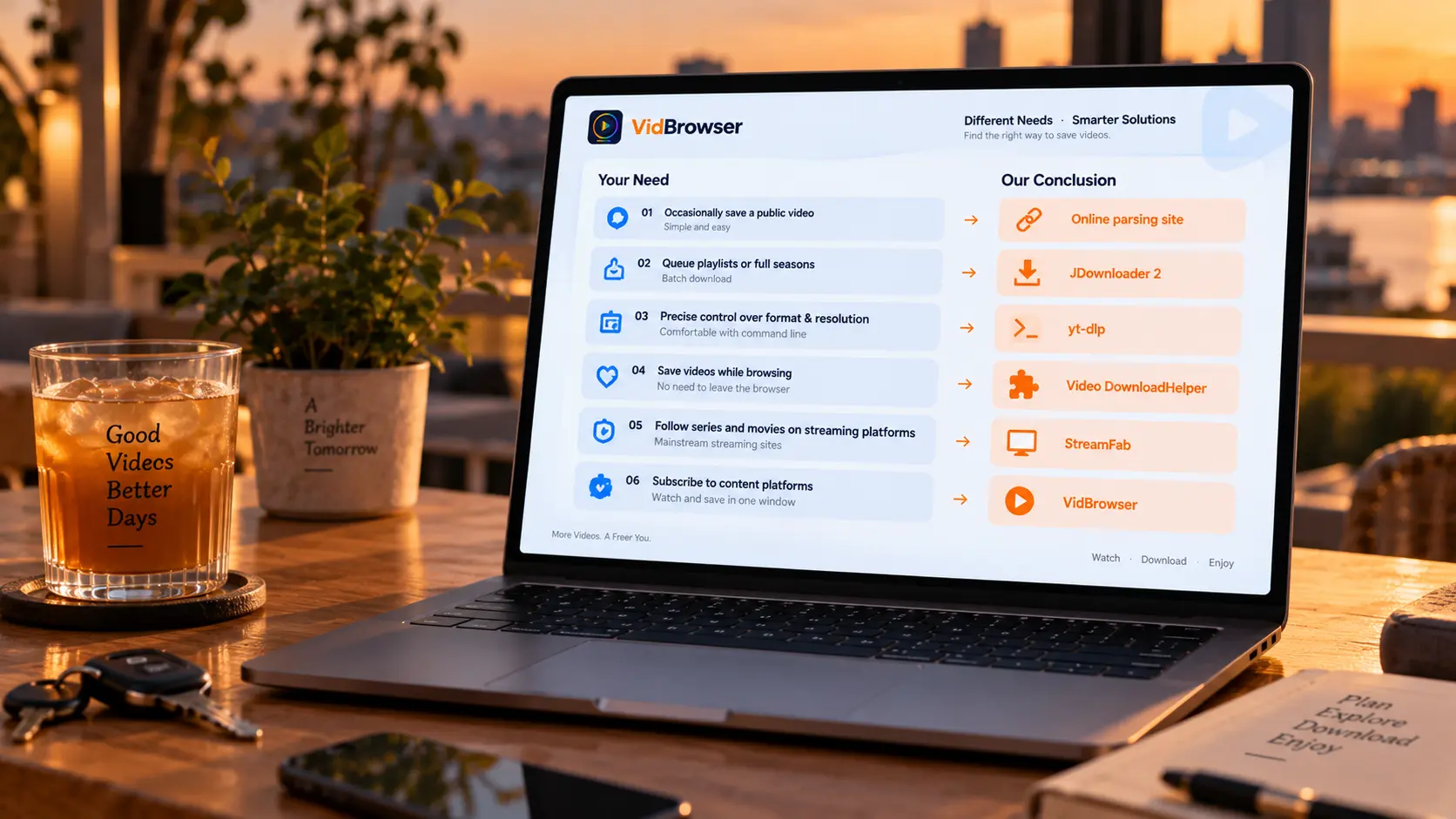
Break your need into three lines: which platform the content lives on, whether you are willing to configure things, and how often you download.Matched against those, your case almost certainly falls into one of the six below.
- Saving the occasional public video, as effortlessly as possible.An online parsing site is enough; for something steadier, the free tier of 4K Video Downloader is a common entry choice — the boundaries of that free tier were accounted for in its own review article, no need to repeat them here.
- Playlists and whole seasons, queued up in one go.Look at JDownloader 2, whose strengths are bulk links and queue management: dump in a pile of links and let it work through them, ideal for a regular transfer routine.
- Fine control over format and quality, not afraid of a terminal.Pick yt-dlp: open source, broad site coverage, and a huge space of tunable parameters; the price is that everything happens on the command line, and when a platform changes its layout, you maintain the updates yourself.
- Saving while browsing, without leaving the browser.A veteran extension like Video DownloadHelper fits; its boundary is "the streams the page hands over", so check its ceiling first if quality matters to you (covered in its own article).
- Mainly after streaming-platform shows and movies.Desktop clients like StreamFab are officially positioned around the major streaming platforms; site support shifts with their versions, so check the official support list before you buy.
- Subscription-platform content, or one app to watch and save.Take the video-browser route: VidBrowser puts "watching" and "saving" in the same window — download for ordinary content, recording as the fallback for protected content, and you skip hunting for a tool per platform.
Readers whose main battlefield is YouTube already have a dedicated single-platform comparison with finer conclusions. If you matched case 6, walk the acceptance flow below once.
After matching, accept the verdict with one real download
Matching on paper is still paper; one real task is what counts — the object of acceptance is the file and the flow, not the specs.Pick the most common scenario from your real needs, take one item, and run the whole way through: does it save properly, is the file complete, are duration and quality right, and would you willingly do it a second time. Four steps.
Step 1: Download and install VidBrowser
VidBrowser is a desktop video browser for Windows and Mac for watching videos, trimming clips and saving them locally, with download and recording built in. Installation takes a few minutes.
Step 2: Open the page you want to save, and pick your saving method
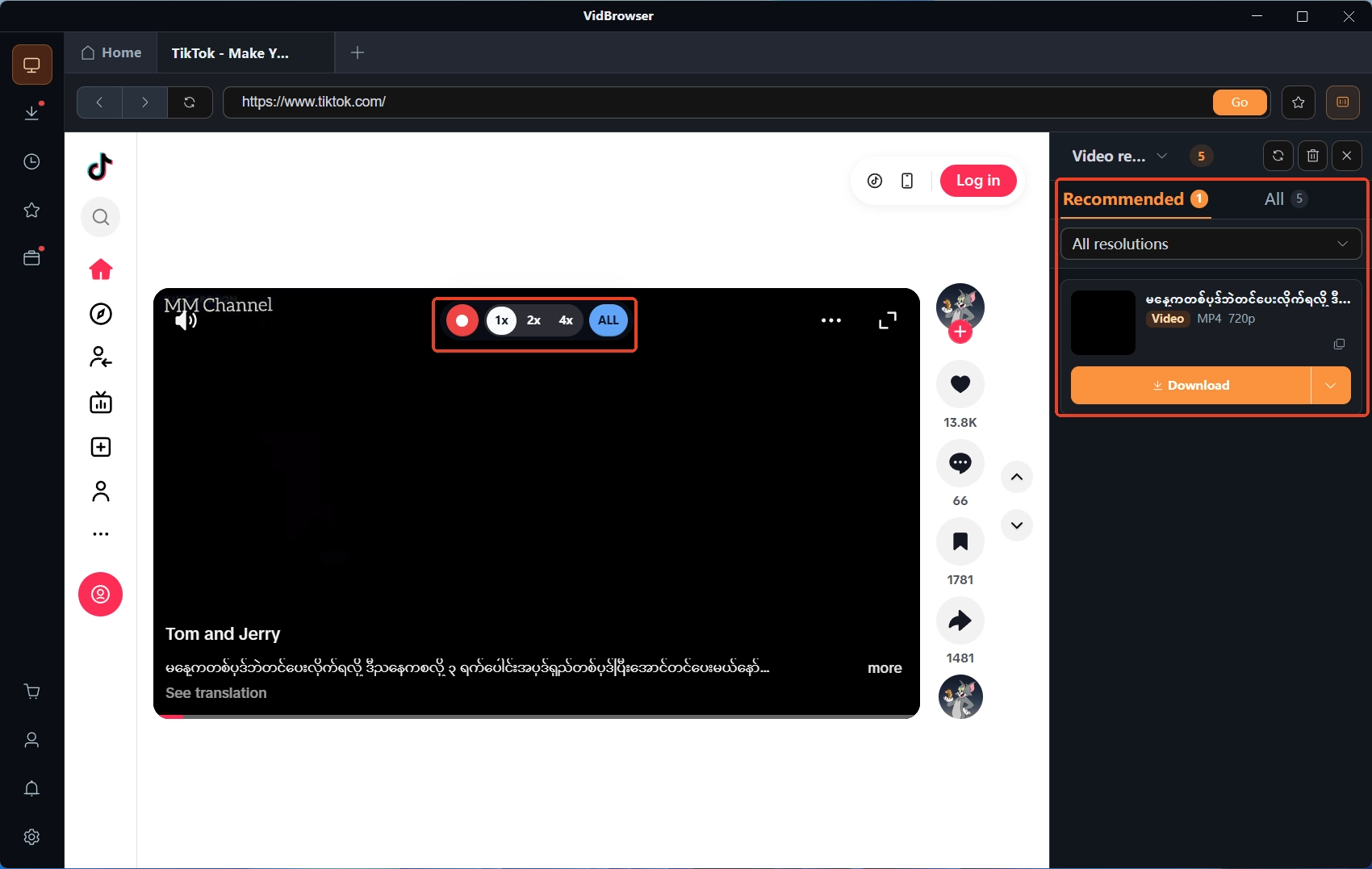
The Video Library panel on the right lists detected videos; click the orange Download button to save as MP4, or pick a resolution first. If the content is protected, move your mouse over the video and the recording controls appear: choose a recording speed (1x real-time, or 2x / 4x to finish faster), hit Record All for the whole video, and pause anytime from the left button.
Step 3: Check results in the download history
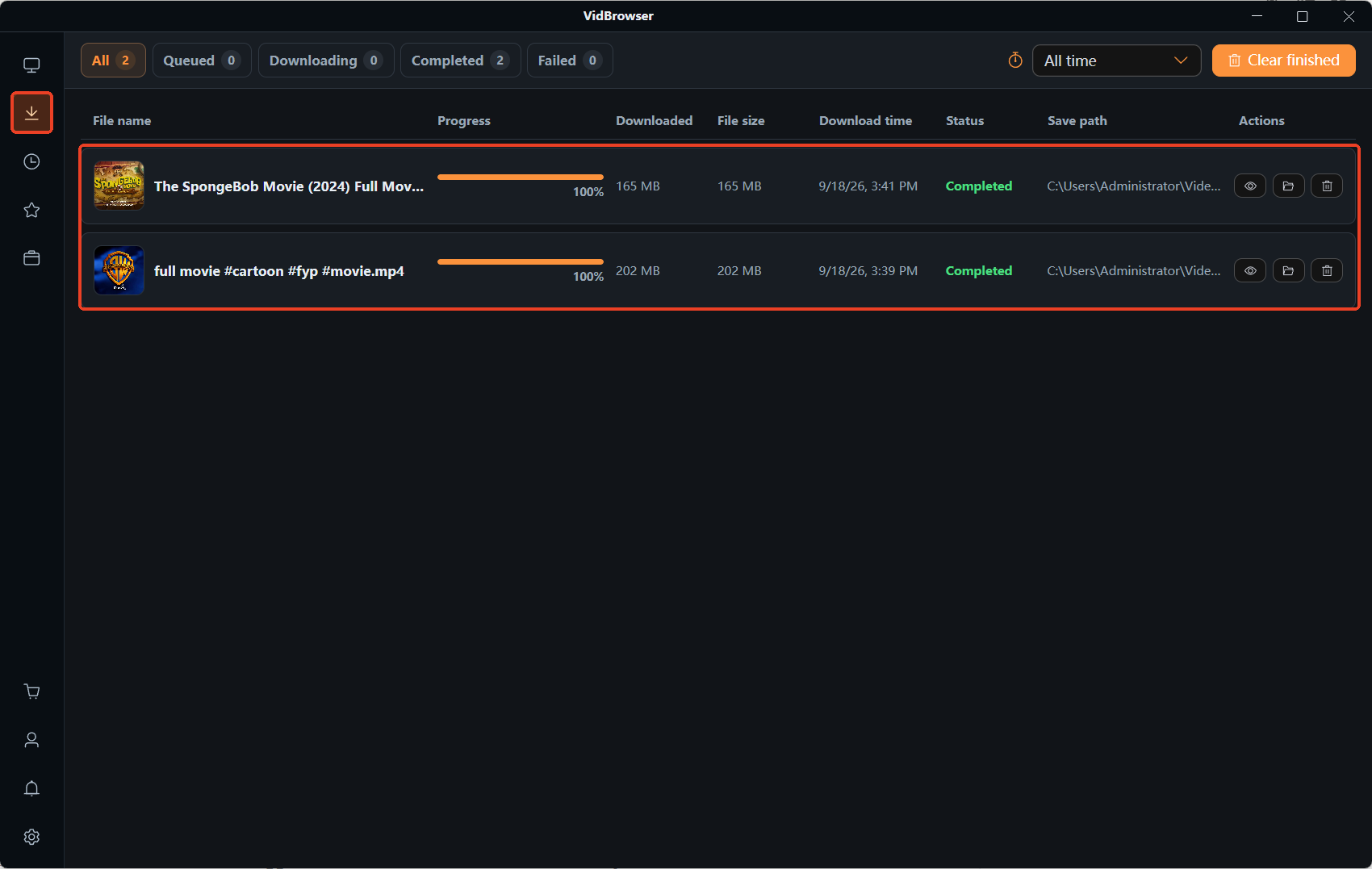
The clock icon in the left navigation opens the download history; scan each row for status, file size and save location. Entries that are suspiciously small or stuck at a standstill deserve a re-check first — do not wait until a pile has built up.
Step 4: Open the file for the final acceptance
Find the file at its save location and play it through once: only when duration and quality match your expectation has the tool passed your need's acceptance. If it fails, go back to the previous section and re-match — when the route itself is wrong, no amount of parameter tuning will fix it.
FAQ
Does an all-in-one downloader really exist?
It exists, but all-in-one describes coverage, not fit. A tool with broad site coverage can still miss in your specific scenario, while a narrower tool that happens to hit your need is the handy one. Treat it as a fallback, never as a stamp of approval.
Are free download tools safe to use?
Usable, but check three things: quota, quality and the source. Free tiers usually trade quota against quality; only install from official sites, no matter how convenient an unofficial build looks. Anything involving account login belongs with reputable software.
How do I judge whether a Best list is worth reading?
Look for three things: does it state the testing method (parsing or play-and-save), does it name the exact content used in tests, and how recent is the update. A list vague on all three is an index, not a conclusion.