
OnlyFans Free Account or Paid Subscription? 2026 Guide to Not Wasting Money
You've followed a bunch of free accounts on OnlyFans, and as you scroll you realize: videos that catch your eye need unlocking, the creators you like show subscription prices on their profiles, and even DM replies cost extra. What's the real difference between a free account and a paid subscription? Without subscribing, can't you see anything at all? And if you do subscribe, aren't you afraid of wasting your money — this is the dilemma every OnlyFans beginner faces.
This article lays out the real differences between free accounts and paid subscriptions and gives you a set of criteria: when to upgrade, and when staying free is the smarter choice.
Free Accounts and Paid Subscriptions Differ in More Than Money
On OnlyFans, creators can set their own subscription price, which gives rise to two kinds of profiles:
- Free account (subscription price $0): anyone can follow and see the free posts on the profile. Creators use it as a "showcase window" — posting previews and clips to attract followers, while keeping full content behind a paywall.
- Paid subscription (subscription price > $0): after paying monthly, you can see full content — all the creator's posts, archive content, exclusive videos, and deeper interaction access.
The core logic: a free account is the entry funnel, and a paid subscription is the content itself. Following a free account is like walking into a store; to see what's on the shelves, you either buy the subscription or unlock items individually.
(For the overall OnlyFans workflow, see our OnlyFans beginner's guide for subscribers — this article only covers the free vs. paid choice.)
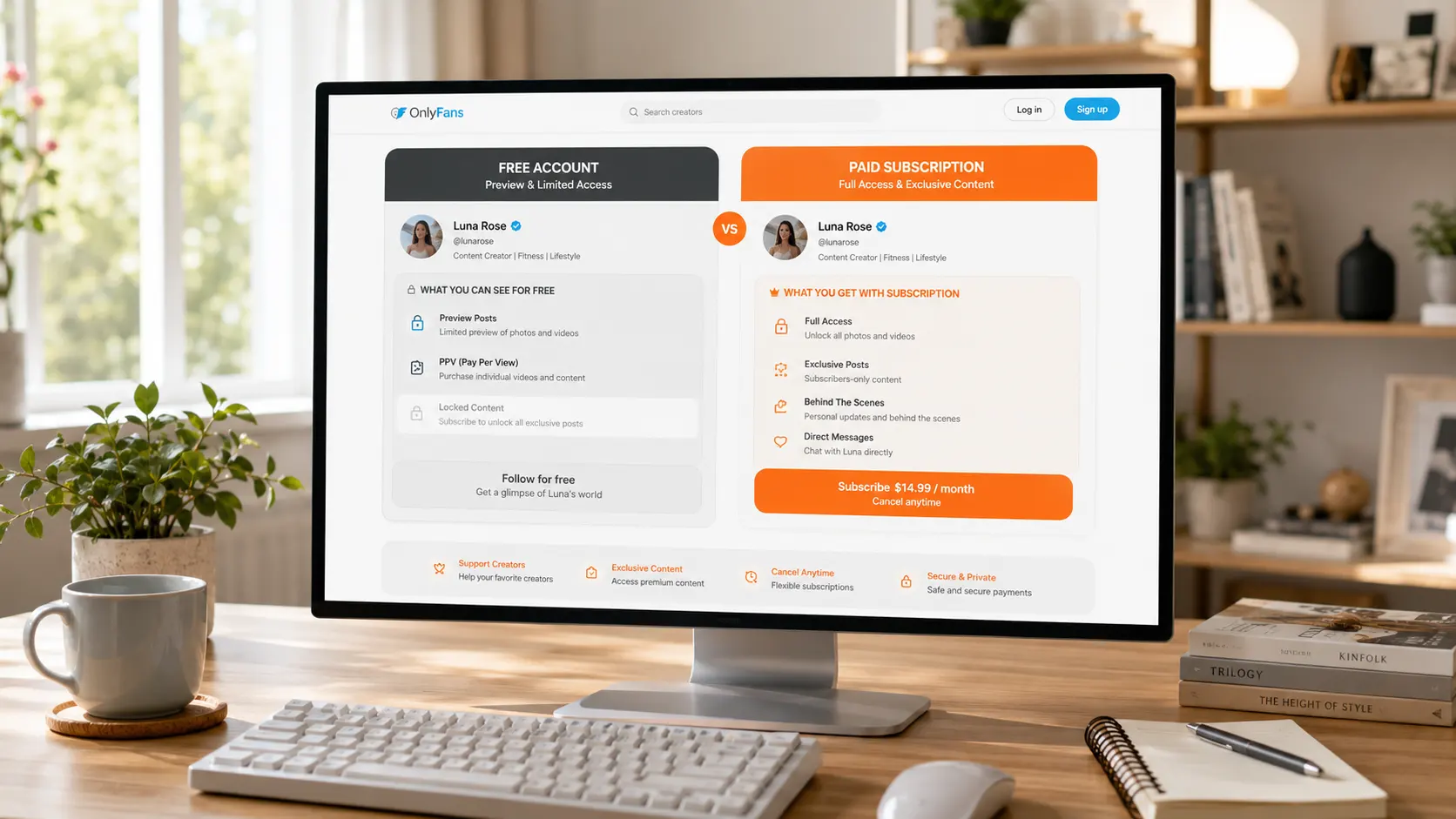
A "Free" Account Doesn't Mean "No Spending"
This is the most misunderstood part. Even though the subscription price is $0, creators monetize through other means — there are three common traps:
- PPV pay-per-view unlocks: free posts are mixed with priced videos, and opening one costs money — this is the most common way free accounts monetize, ranging from a few dollars to tens of dollars per item.
- Pay-to-message: some creators set "pay to send a DM" or "pay to unlock DM replies," so even interacting costs money.
- Extra charges attached to posts: free posts are just previews; the actual content (especially videos) needs to be purchased separately.
So the real meaning of a "free account" is "free to enter, content billed separately." With some creators, scrolling through a free account can end up costing more than just subscribing directly.
When a Paid Subscription Is Worth It
When deciding whether to upgrade, don't just look at how attractive the free content is — run through these four criteria:
- Consistent posting frequency: Does the creator post new content every week? Does the profile show recent activity? A creator who posts twice a month offers very low subscription value.
- Is the free content a "preview" or "everything": If the free account already satisfies you, there may not be much increment behind the paywall; if the free content is clearly just a teaser, the paid part is the real deal.
- Archive content worth browsing: a paid subscription lets you see everything the creator has posted in the past. More quality old posts mean a faster return on a single subscription.
- Price matches content volume: do the math — subscription price × how often you actually watch. If you watch several posts a week and dig through the archive, $10-15/month is comparable to a streaming service, so it's worth it; if you subscribe and only watch twice, it isn't.
(For a fuller value assessment, see our Is OnlyFans worth it?)
When Staying Free Is the Smarter Choice
Conversely, don't rush to upgrade in these situations:
- You only drop by occasionally: if you don't open it more than a few times a month, the free posts are enough — no need to pay monthly.
- The creator posts the same content on multiple platforms: if the same content is also free elsewhere, subscribing means paying twice.
- The free account's PPV already meets your needs: occasionally spending a few dollars to buy one item is cheaper than a monthly subscription.
- You're not sure it's worth it: use the free account for two or three weeks first, observe the posting rhythm and content quality, then decide — don't subscribe on impulse.
A free account is the best "trial sample": evaluate a creator at zero cost, upgrade if satisfied, and move on to the next one if not.
Once You Subscribe, Remember to Save the Content
Free or paid, OnlyFans content only exists on the platform: creators can delete posts or close their account at any time, and after your subscription expires, all archive content becomes invisible — you paid for content that can vanish at any moment. (The risk of paid content disappearing is the same as this common platform-wide problem of disappearing content.)
So for videos you genuinely love and want to rewatch, saving them locally is the most reliable approach. Using VidBrowser is simple:
Step 1: Download and install VidBrowser
VidBrowser is a desktop video browser for watching videos, capturing clips, and saving them locally on Windows and Mac, with built-in download and recording features. Installation takes just a few minutes.
Step 2: Open OnlyFans in VidBrowser and log in
Launch VidBrowser, go to onlyfans.com, and log in with your own account. Free and paid permissions work exactly the same as in a regular browser.
Step 3: Play the video you want to save
Open the video and let it play for a few seconds. VidBrowser automatically detects video resources on the page in the background and, once it finds a savable video stream, lists it in the "Video Library" panel on the right.
Step 4: Download or record — two ways to save
The "Video Library" panel on the right lists all detected videos, each with an orange "Download" button — click to save as MP4. You can also choose a resolution before downloading: higher for quality, lower to save space.
If you run into content that can't be downloaded (some protected content, special content that fails to parse), use the recording feature as a fallback: hover over the video and recording controls appear — choose a recording speed (1x real-time, 4x to finish faster), click "Record All" to record the whole video, and the button on the left starts or pauses anytime. Anything that can play can be recorded.
Step 5: Find the file in your library
After saving or recording, you can open the file from the folder you chose or find it in VidBrowser's download history. Then watch offline anytime with players like VLC or QuickTime, without depending on your account or subscription status.
(For full download details, see our OnlyFans video download guide.)
FAQ
Can I switch between a free account and a paid subscription anytime?
Yes. Upgrading from a free account to a subscription and dropping back to free after expiry are both normal. When a creator changes the subscription price, you don't need to do anything — renewals follow the new price.
Can I save content I see on a free account?
Yes. As long as the video plays normally in the browser, VidBrowser can save it — whether it comes from a free post or unlocked content. Free content can be deleted too, so anything you like is worth saving.
Should I subscribe to one paid account or several cheaper ones?
It depends on your budget and how much you follow. Creators you follow deeply deserve a subscription; for those you only check occasionally, a free account plus PPV is more cost-effective. People who subscribe to too many accounts often find they never have time to watch everything (for managing too many subscriptions, see our OnlyFans beginner's guide for subscribers).


