
How to Save Pornhub Videos: Reliable Methods After Downloads Were Shut Off & Playback Fixes
Scrolling Pornhub and finding a video you want to keep, only to discover there's no download button anywhere — that's not you missing something, the platform simply closed the door. Worse, after wrestling a file out of a third-party tool, you double-click it and get one of three disappointments: a few dozen seconds long, black screen with sound, or it won't open at all. This article covers both things in one go: why the download channel disappeared, and how to pinpoint the problem when a file won't play.
Pornhub's official download is shut off — third-party tools are the only path left
Pornhub currently has no official download feature for regular users, so third-party tools are the only remaining way to keep a local copy. That's not a technical oversight but a deliberate tightening: in late 2020 the platform went through a major overhaul, and according to multiple media reports at the time, Pornhub removed tens of millions of unverified videos in one sweep and shut down the download channel for ordinary accounts at the same time, tying content access to account verification. For everyday users the result has been that the page has shown no "Download" button ever since.
The platform's scale explains the caution: Pornhub's 2024 year in review puts monthly visits at roughly 3.5 billion, with female viewership up to 38%. The bigger the traffic, the heavier the copyright and compliance pressure — tightening the "copy and redistribute" loophole has been a consistent direction. (For how free content weighs against paid subscriptions, see our Pornhub vs subscription platforms comparison.)
Three ways downloader tools fail: wrong stream, broken stream, fake stream
Once the official channel closed, downloaders and browser extensions became the go-to — but results tend to fall into three categories, each with a tell-tale sign.
- Wrong stream: the file plays, but it's only a few dozen seconds — you likely saved an ad or an in-page promo teaser, not the actual video. Pornhub pages are packed with streaming media, and tools that grab "the first video stream" are especially prone to this
- Broken stream: the site delivers video via HLS segments; if the tool saves without merging them you get a pile of .ts files or a glitchy file that freezes halfway
- Fake stream: labeled 1080p but looks like 480p — free videos only have limited transcode tiers, so the tool may have grabbed a low-bitrate copy rather than the stream the page player is actually playing
To confirm what you saved is the creator's original upload rather than a re-uploaded teaser, the method is in finding a creator's original post from Pornhub — check the uploader's profile before saving.
Playback troubleshooting after downloading: check duration, then container, then decoding
When a file won't play, narrow it down in three steps — duration → picture → container — and most causes surface within two minutes.
- Wrong duration (only tens of seconds): the wrong stream was grabbed at the source. Re-save with a different tool instead of wasting time repairing the file
- Black screen with sound: the picture stream never got captured — common on pages using picture protection. Such files are basically unsalvageable; the problem is in the saving step, not the playback step. The principle is covered in our black screen video fix guide
- Won't open at all: usually a container or codec compatibility issue (WebM, TS segments and HEVC are all common). Try VLC, or follow our format and playback compatibility guide — we won't expand here
- Stuttering or glitchy playback: the segmented download broke off midway and the file is incomplete. Do one clean full re-save
Order matters: many people re-encode the moment a file won't open, only to discover half an hour later the file itself was half-finished — confirm you "saved the right thing" before trying to make it "play".
Saving from Pornhub the reliable way: download first, record as backup
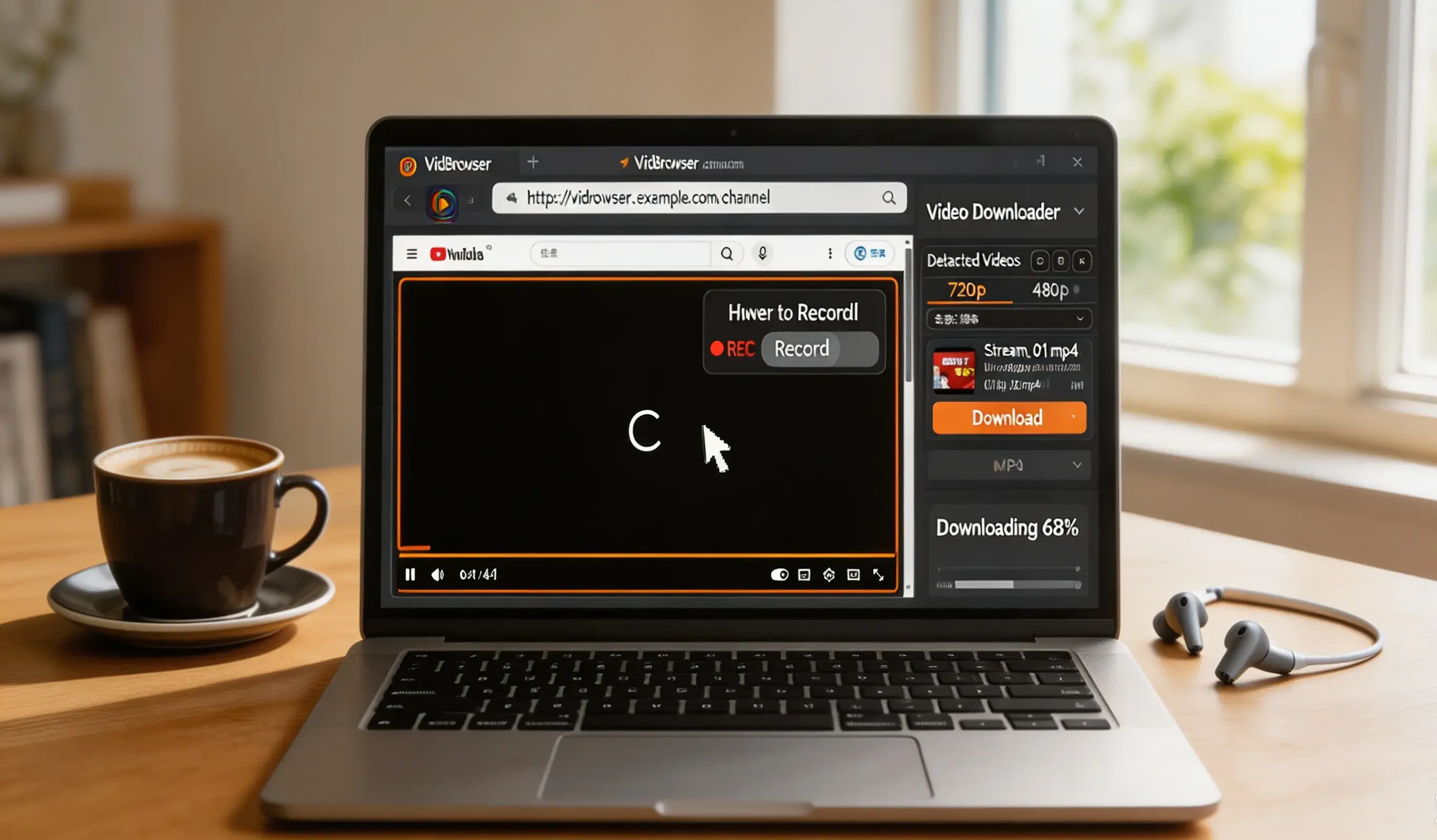
To sidestep the pitfalls above, a tool that bundles downloading and recording is the easiest route. VidBrowser is a desktop video browser, and it only takes a few steps:
Step 1: Download and install VidBrowser
Works on Windows and Mac, with both video download and recording built in — installation takes a few minutes.
Step 2: Open Pornhub in VidBrowser and play the video
Visit the site and play the video you want for a few seconds. VidBrowser automatically detects video resources on the page and lists them in the "Video Library" panel on the right.
Step 3: Filter by resolution and download directly
Pick the quality you want in the panel's resolution dropdown (defaults to "All resolutions") and click the orange "Download" button to save as MP4 or WebM, avoiding low-bitrate copies. The download history (clock icon on the left) shows filename, size and save location — double-click and play two seconds on the spot to verify.
Step 4: For videos that can't be downloaded, use recording as backup
For the occasional video where the download channel can't capture a complete stream, the recording feature solves it: hover over the video and the recording controls appear as an overlay — choose a recording speed (1x real time, 2x or 4x to finish faster), click "Record All" to record the whole video, and the record button on the left can start or pause anytime. Anything that plays can be recorded.
The limits of saving: verification, copyright and personal use
Being able to save doesn't mean free to redistribute — draw this line early. Three practical notes:
- Account and verification: since the 2020 overhaul, uploading, commenting and similar privileges are tied to identity verification, and unverified accounts have limited features. Saving tools don't need your site password — close any "downloader" that asks for your credentials
- Copyright: videos on the site belong to their uploaders or producers; saving is for personal offline viewing only. Re-uploading or editing for distribution can infringe copyright
- Local laws: some regions have explicit legal restrictions on accessing adult content — check and follow the rules where you live and the platform's terms of service
FAQ
Does Pornhub have an official app or offline download feature?
Neither. Adult content can't get into mainstream app stores, so Pornhub has no official app (similarly named store apps are all unofficial, same reason OnlyFans has no official app); the official download channel has been closed to regular users since late 2020, so offline saving relies on third-party tools.
The downloaded video is only a few dozen seconds — now what?
You grabbed an ad or a promo teaser, not the actual video. Repairing the file is pointless; re-save with a tool that can identify the main video stream, or simply record the whole playback with the recording feature.
Can saving Pornhub videos give you a virus?
It depends on where the tool comes from. Sketchy "free downloader" websites are a common infection source — get software only from official channels and watch for bundled options during install. A saving tool shouldn't need your account password; drop any that asks.


