OnlyFans vs Fansly vs LoyalFans Live: How the Three Subscription Platforms Differ
Yesterday the same creator hosted an interactive live stream on Fansly; today they listed a ticketed show on LoyalFans — both are "live streams", yet the entry rules are entirely different: some let subscribers walk straight in, some require buying a ticket, and others end with no replay at all. On OnlyFans, Fansly and LoyalFans, live streams differ in entry rules, payment model and what happens after the stream ends — knowing the differences before you follow a stream beats scrambling once it has started. This guide lines up the live features of all three platforms side by side.
Live Features Compared: Entry, Payment and Replay Differences
The three platforms in one line: OnlyFans live streams are real-time events inside a subscription, Fansly rooms are gated by an active subscription by default, and LoyalFans runs a show-style mix of free, ticketed and tip-driven rooms — "rewatchable" is a default right on none of them.
First, the three side by side:
- Entry rules: OF's live entry sits on the creator's profile, with three access types — inside subscription, PPV per show, and tipper-only; most Fansly streams are open to current active subscribers, and once the subscription lapses the room is closed to you; LoyalFans runs all three types side by side, with paid rooms clearly priced before entry.
- Payment and tips: the platform cut is 20% on all three, and tipping works in every live room (see the fans-alternative three-platform comparison). The difference is where the money flows — OF unlocks special shows via PPV and tips, Fansly relies on subscriptions plus live tips, and LoyalFans turns tickets into its main payment method.
- After the stream: OF has no native replay, and a rewatch only exists if the creator posts a recording; whether Fansly keeps a replay and for how long is up to the creator; LoyalFans has no unified public policy — follow the creator's settings and the room page.
The sections below expand platform by platform; complete single-platform tutorials are linked, so only the points that matter from a comparison view are covered here.
OnlyFans Live: Real-Time First, Replays Depend on the Creator
OnlyFans live streams come in three access types — free within a subscription, paid PPV per show, and tippers-only rooms; the platform itself offers no replay, and once it is over, it is over.
This "miss it and it is gone" is the biggest difference between OF and the other two: Fansly and LoyalFans at least leave room for "the creator might keep a replay", while OF does not even offer that. A rewatch only appears if the creator posts the recording as a post — and that post is an ordinary one, deletable or archivable at any time. (How to watch and set stream alerts is covered in detail in our OnlyFans live guide; how long live content survives is broken down by subscription period, creator survival and real-time nature in our OnlyFans save-timing guide.)
Getting into a Fansly Live Room: Subscription Is the Ticket, Replays Are a Gift
Most Fansly streams are open to current active subscribers — once the subscription lapses you cannot enter the room; tipping works during the stream, and whether a replay exists and how long it stays are decided by the creator.
For viewers this means two things: as long as the subscription is active, the room is there — if you want to follow a creator's streams reliably, keep the subscription alive first; and a replay is a gift from the creator, not a platform promise — plans like "I will watch the replay in a few days" turn into regret once the replay is gone. (The full workflow of entry, stream alerts and recording while watching lives in our Fansly live guide.)
LoyalFans Ticketed Live: Free Rooms Draw Crowds, Paid Rooms Are the Show
LoyalFans turns live into a show floor: free rooms draw the crowd, ticketed rooms are priced openly, tips happen throughout the stream, and one-on-one private shows exist — live streaming itself is one of the platform's core revenue scenes.
A few details useful for viewers:
- Live is built into the platform — no third-party software needed; open a creator's profile to see their live status;
- Who can watch is controlled by the creator — restricted to subscribers only, or open only to those who have tipped (per the dommesource platform feature roundup);
- Paid rooms show their price before entry — read whether it is a "ticketed show" or a "free room with tips", because the two play out differently in cost;
- Creators keep 80% of live earnings, consistent with the 20% cut on the other two platforms — tickets are not double-dipped.
(For judging the boundary between free and paid content before subscribing, our LoyalFans free vs paid guide breaks it down.)
Missed a Stream? Recording Beats Betting on a Replay
None of the three platforms gives solid replay guarantees, so for anyone following streams across platforms the safest move is to record the shows you want while they are live — a stream that plays can usually be saved by recording.
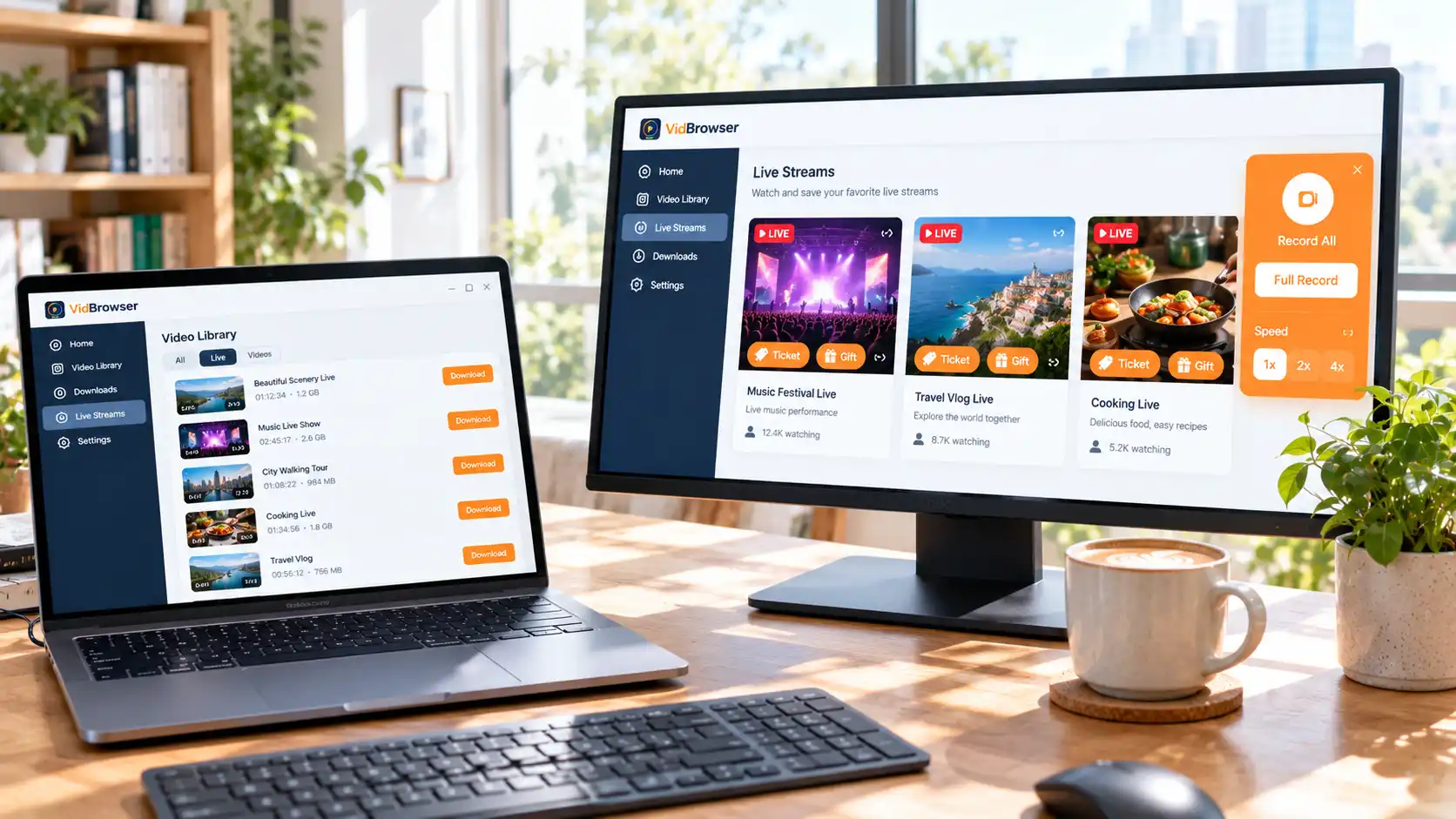
Today's interactive room is on Fansly, tomorrow's ticketed show is on LoyalFans — no tool change needed. With VidBrowser the whole thing takes four steps:
Step 1: Download and install VidBrowser
VidBrowser is a desktop video browser for Windows and Mac for watching and saving live streams and videos, with built-in download and recording. Installation takes minutes.
Step 2: Open the platform and log in
Visit Fansly or LoyalFans inside VidBrowser and sign in with your own account — subscriptions and ticket access work exactly as in a normal browser.
Step 3: Enter the live room and let it play
Once the stream starts, check the quality tier first — recording keeps what is played, so raise the quality before you record if you want HD.
Step 4: Save with the recording feature
Hover over the live view and the recording controls appear: click "Record All" to capture the show from the current point, and the record button on the left can start or pause at any time; speed options are 1x real-time, 2x and 4x — follow a live stream at 1x, and use the faster speeds for finished long replays. When it ends, check the download history via the clock icon in the left navigation — the file is already on your disk. (If the page offers a directly downloadable source, the "Video Library" panel on the right lists it with an orange "Download" button — pick the resolution the page actually provides and save.)
Saving assumes you already have viewing access and is for personal organizing and offline viewing; whether saving works depends on how the page loads. Reposting or redistribution is out of scope here.
FAQ
Do all three platforms charge extra to watch live?
Not necessarily. On OnlyFans, streams inside a subscription are free while PPV shows and tipper-only rooms cost extra; Fansly admits active subscribers with optional tips; LoyalFans free rooms cost nothing and ticketed shows are paid per show. Read the room's labels before entering and you will not overspend.
Can a missed stream be rewatched later?
Keep expectations low. OnlyFans has no native replay; whether Fansly keeps one, and for how long, is the creator's call; LoyalFans makes no unified public promise. For shows that matter, record while they are live.
Which platform's live experience suits me best?
It depends on what you want: for spontaneous interaction and per-show PPV, OF's live scene is the most direct; if you follow creators on a subscription rhythm, Fansly ties rooms to subscriptions most tightly; for show-floor vibes, special events and private interaction, LoyalFans' ticket system is the most complete. If you chase streams across platforms, the point is not picking a side — it is never betting on a replay.