
VK videos will not save as files? The official stance and three saving routes
Want to keep a video from a VK community for offline viewing, save a Clip short before it disappears from the feed, or catch up on a livestream you missed — and then find that VK's player has no right-click save and no download button anywhere on the page. On downloads VK has gone halfway: the mobile app caches videos for offline viewing inside the app, but the file never leaves. Get the official position, the three content types and the reachable boundary clear first, then decide how to land a local copy.
VK's official position splits in two: offline caching is given, the file is not
The VK help center states it plainly: you cannot download a video as a file to your device, but you can save videos in the VK Video app to watch offline later.The path is to open the video, tap the three-dot icon at the top right and choose Download, and the video moves into the app's own offline area — that cache is bound to the app, cannot be copied to another device, and is not a file you can double-click. The official FAQ also notes one exception: videos you uploaded to a chat can be saved into your phone's gallery from the mobile app, but other people's videos cannot be saved as files. In other words, what the official offline ability gives you is "watch it in VK", not "take a copy away". Telegram sits in a similar spot — the piece on how to save Telegram videos already covered it, and the two platforms share much of their audience, so the pain feels the same.
Community videos, Clips and livestream replays: three types, each with its own entry
VK's video content comes in at least three types, and the entry points and saving approaches differ.The first is regular videos in communities and personal pages, opened from a community's video tab or the feed, with addresses starting with video; the second is Clips, the vertical shorts, with addresses starting with clip — close to TikTok-style short content, so the judgment laid out in watermark-free TikTok saving applies here as well; the third is livestreams, which run as a live stream while on air, with a replay page usually offered afterwards. On the web all three meet the same player with the same missing download button; what differs is where you enter and how time-sensitive the content is — livestreams are the special case, since missing the live session leaves catching up dependent on a replay existing.
Only public content is reachable: see this boundary first
What can be saved is public content; closed communities and age-restricted content are not on the list.VK communities come public or closed, videos inside closed communities are invisible beyond their members, and such content is unreachable for any external tool — the address itself is not a file and access requires identity, the very mechanism covered in why streaming videos are hard to download directly. Public videos, Clips in public communities and livestreams with replays are the pool that can become files. Before starting, run one self-check: open that item in an incognito window; if it plays without logging in, there is a next step — if it does not open, no tool will help either.
VK officially warns against download programs — where the risk sits
The VK FAQ carries a weighty sentence: programs advertised as able to download VK videos are dangerous to your device and account, and your account may be stolen because of them.The warning points at online download sites and tools of unknown origin — they often ask you to log in to VK, install unclear extensions, or hang fake download buttons on the page. The way around is just as direct: never use any option that asks for your VK credentials, and skip any extension whose origin cannot be explained. A desktop tool that runs locally and never takes over your account has a far smaller risk surface — that is the line the official warning really draws.
Saving VK videos with VidBrowser: a four-step walkthrough
For public content on desktop there are four steps, and both download and recording paths are open.
Step 1: Download and install VidBrowser
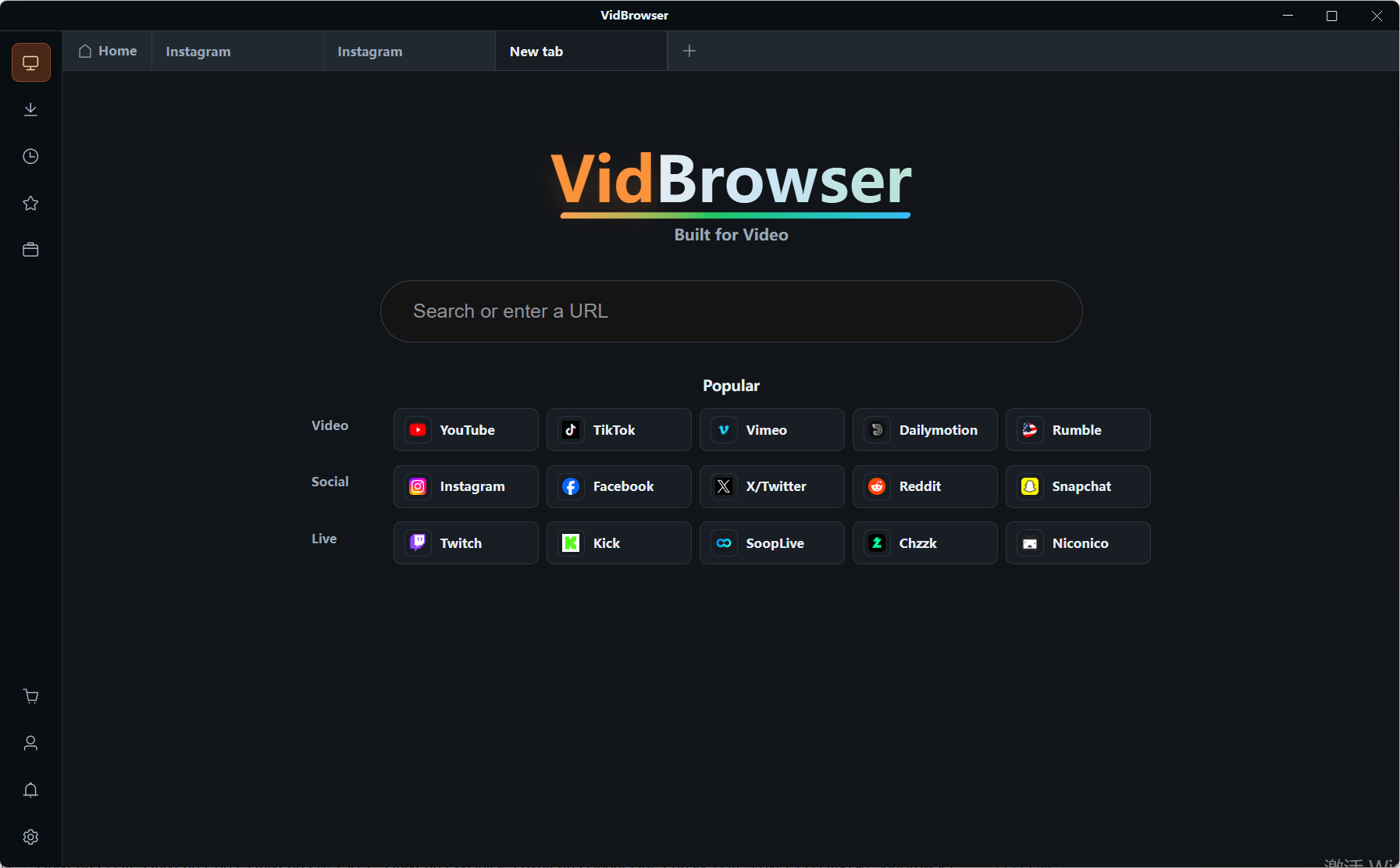
VidBrowser is a desktop video browser for watching videos, grabbing clips and saving them locally on Windows and Mac, with downloading and recording built in; the installer is on the official site home and takes minutes to set up.
Step 2: Open VK in the built-in browser and play the video
Enter vk.com in VidBrowser's address bar, log in to your own account, and open the video, Clip or replay page you want to save. Closed-community content still requires membership first; the tool does not change that layer.
Step 3: Download regular videos directly
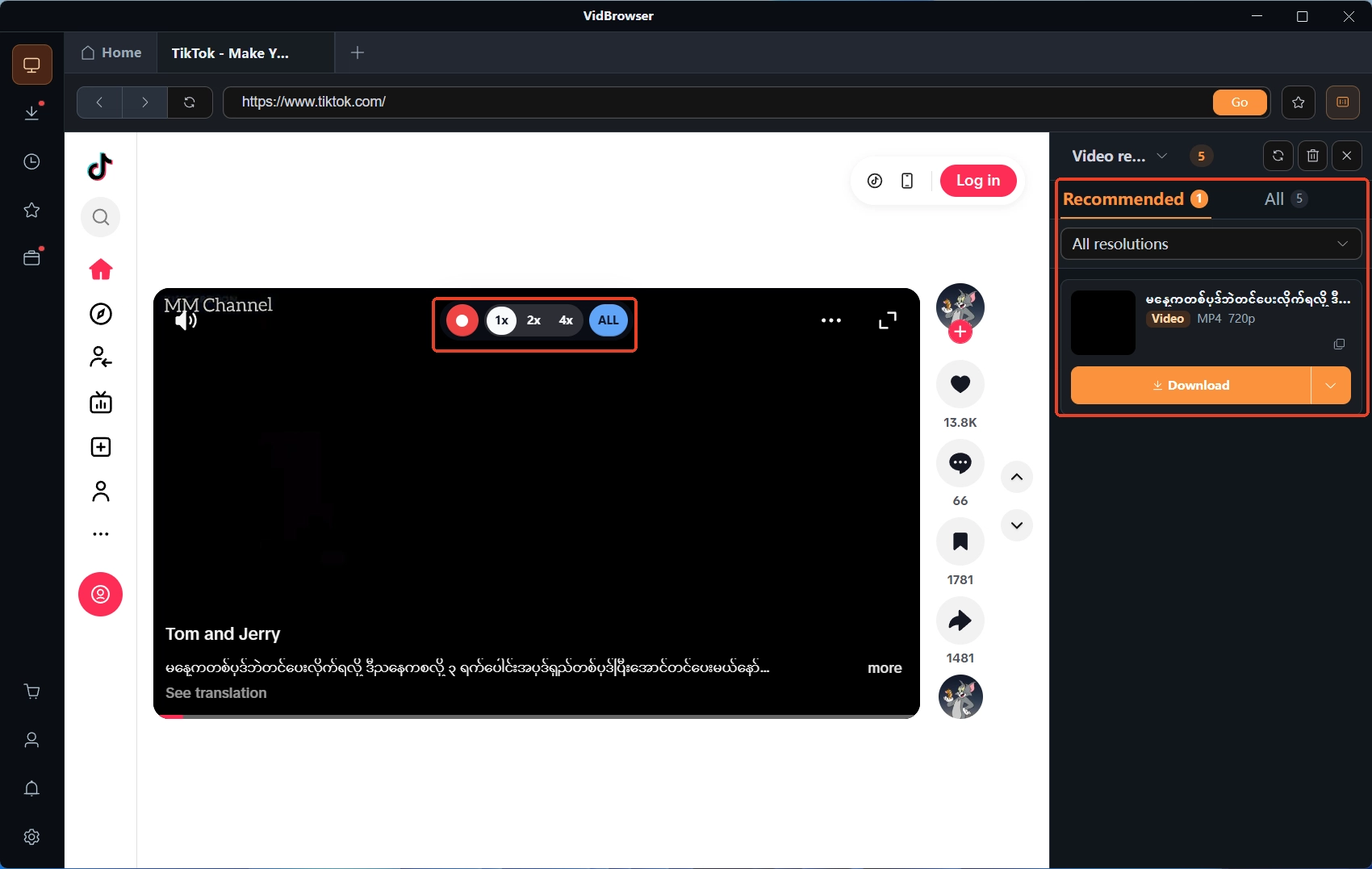
While playing, the "video media library" panel on the right lists the detected video resources, each with an orange "download" button, and you can pick the resolution first if you like. Community videos and Clips mostly take this path, saved straight to MP4 files. The quality ceiling is set by the version the uploader published — a 480p upload will not turn sharper out of nowhere.
Step 4: Record live streams in real time
A stream on air has no file to grab, so use recording: move the mouse over the video and the recording controls overlay on top, choose a recording speed (1x real time, or 2x/4x to finish faster), hit "record all" to capture the whole stream, and the record button on the left pauses at any time. The finer points of capturing a live stream end to end are expanded in the Twitch livestream recording piece. Replay pages go back to Step 3 and are handled as videos, and every task is logged in the download history in the left navigation.
The files you save have no tie to VK's servers; deleted posts, removed videos or account changes do not touch the copy already on your disk.
FAQ
Missed a VK livestream — can it still be saved?
While the stream is live, capture it with recording; once it ends the platform usually provides a replay page, and a replay is handled as a regular video — download from the panel. Whether a replay exists and how long it stays depend on what that stream's page shows.
Can online download websites be used?
The official warning is explicit that such programs may endanger your device and account. What to avoid are sites that ask for a VK login, push unknown extensions, or hang fake buttons on the page; a desktop tool running locally never involves handing over your account, so the risk profile differs.
What format and quality are the saved videos?
Regular videos and Clips save as MP4 files, with quality capped by the uploader's version; a livestream recording produces a recording of the full live session, with a length matching the stream.


